Our company logo

State

Optimizing Wi-Fi Connectivity for Smart Garage Door Openers


Published: Mar 20, 2026

You tap the app to close your garage door from the office, but it spins endlessly. You pull into the driveway after a long day, ready for the magic of your garage opening automatically, but nothing happens. The promise of a “smart” garage feels anything but intelligent when the Wi-Fi connection is constantly dropping.

If this sounds familiar, you’re not alone. It’s one of the most common frustrations for homeowners embracing smart technology. But here’s the good news: the problem usually isn’t a faulty opener. It’s your garage itself.

Before you spend hours on hold with tech support or buy a new opener, let's have a friendly chat about why your garage is a Wi-Fi black hole and walk through a simple, step-by-step plan to fix it for good.

The Garage Wi-Fi Challenge: Understanding the Enemy
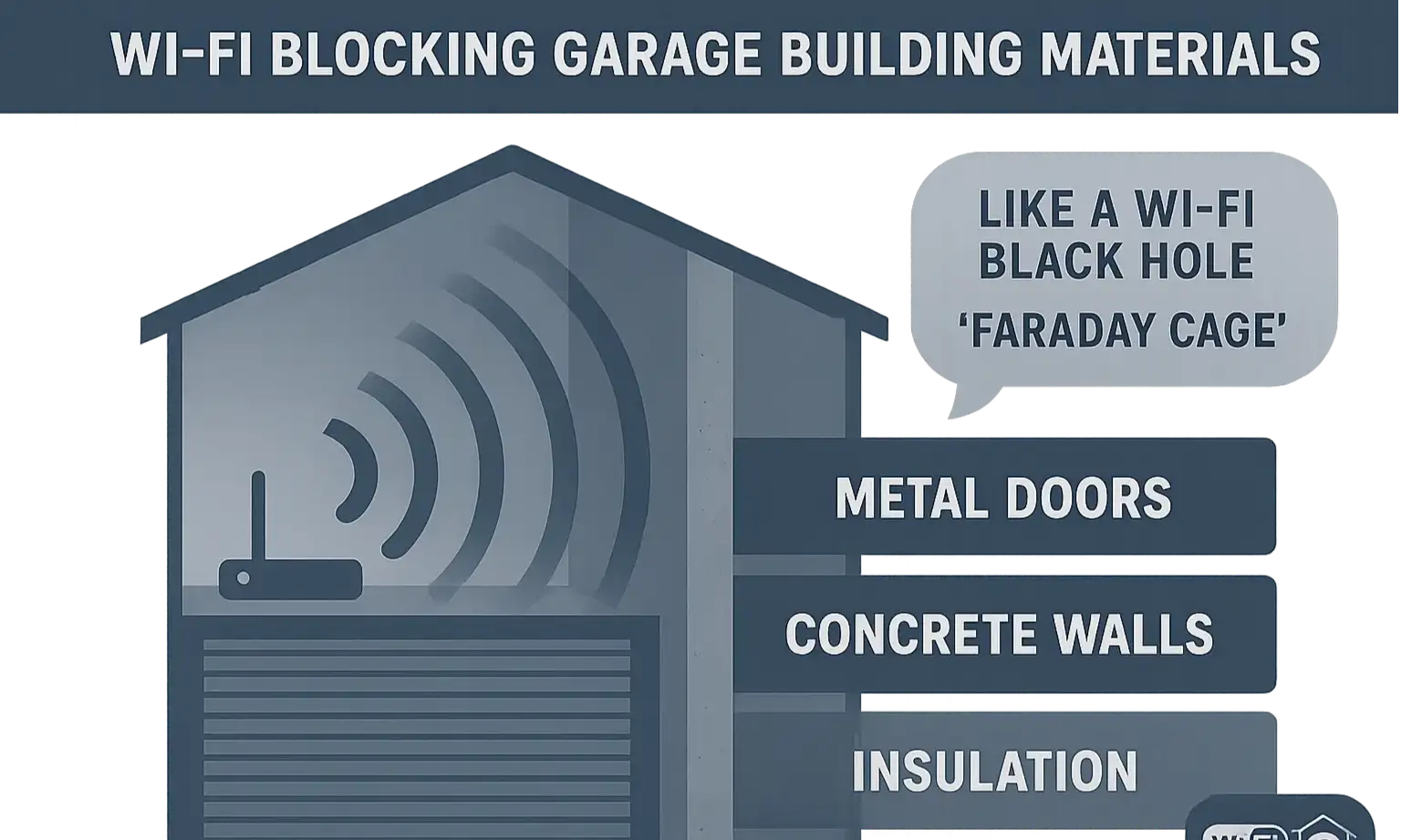

Think of your home’s Wi-Fi signal as a lightbulb. Inside your house, the light travels pretty easily through drywall and wooden doors. But your garage is different. It’s often built like a fortress, specifically designed to keep things out—including a reliable Wi-Fi signal.
Several common culprits work together to block or weaken the signal before it ever reaches your smart opener:
See how garage materials create Wi-Fi dead zones and why connectivity issues occur.

  • Distance: Your Wi-Fi router is likely in a central location like an office or living room, which can be a long way from the garage.
  • Construction Materials: This is the big one. Concrete, brick, and metal are Wi-Fi’s worst enemies. Signals struggle to pass through these dense materials.
  • The Garage Door Itself: Many garage doors are made of steel or have foil-backed insulation. When closed, your door becomes a giant metal shield, effectively blocking the signal from the outside world.
  • Interference: Other electronic devices can interfere with your Wi-Fi signal. Fluorescent lights, tool chargers, and even refrigerators in the garage can create "noise" that disrupts the connection.
Essentially, your garage can act like a Faraday cage, an enclosure designed to block electromagnetic fields. It’s no wonder your smart opener is struggling to stay online.
See how garage materials create Wi-Fi dead zones and why connectivity issues occur.

Become a Wi-Fi Detective: How to Test Your Signal Strength
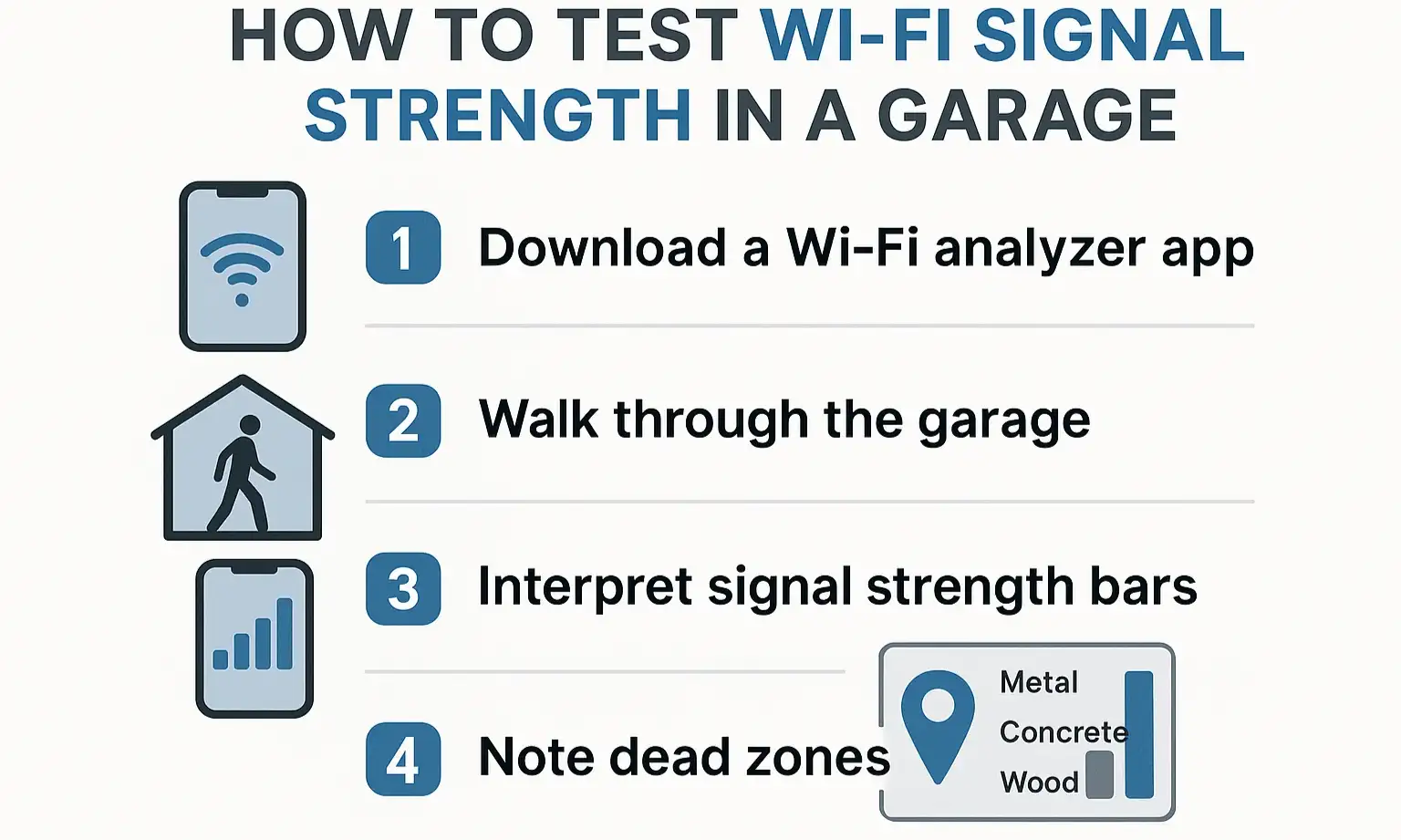

Before you can solve the problem, you need to understand its scale. Guessing won’t get you far, but a few minutes of detective work with your smartphone will give you all the data you need.
Here’s how to measure the actual Wi-Fi signal strength right where your garage door opener is mounted:
Visual guide to check your garage’s Wi-Fi strength—the first step in fixing smart opener connectivity issues.
Stand Right Under the Opener: Position yourself as close to the smart opener's housing as possible. This is the spot that matters.
Use Your Phone's Wi-Fi Icon: The simplest test is to look at the Wi-Fi icon on your phone. Are you getting one bar? Two? If it’s less than full strength, you’ve confirmed a weak signal.
Get a More Precise Reading: For a better diagnosis, use a Wi-Fi analyzer app (many are free on the App Store and Google Play). These apps measure signal strength in dBm (decibel-milliwatts).

  • -30 to -60 dBm: Excellent to good signal. Your opener should have no issues.
  • -61 to -70 dBm: Okay signal. You might experience occasional drops.
  • -71 dBm or lower: Poor signal. This is likely the cause of your connectivity problems.
This simple test gives you a clear, data-driven starting point. A weak dBm reading confirms that you need to find a way to boost the signal reaching your opener. Understanding signal strength is a crucial first step, and it's important to know how to extend garage door opener range for both Wi-Fi and remote controls.
Visual guide to check your garage’s Wi-Fi strength—the first step in fixing smart opener connectivity issues.

The Ultimate Wi--Fi Solution Playbook for Your Garage


Now that you’ve diagnosed the problem, it’s time to choose the right solution. We’ve organized these fixes into a tiered playbook, starting with the simplest and most affordable options. Begin with Tier 1 and only move on if your problem persists.

Tier 1: Quick & Easy Fixes (Try These First!)

Before spending any money, try these simple adjustments. You might be surprised by how effective they can be.
  1. Reboot Everything: The classic tech support advice exists for a reason—it often works. Unplug your router and your garage door opener. Wait 30 seconds, plug the router back in, wait for it to fully connect, and then plug the opener back in.
  2. Move Your Router: Can you move your router to a more central location in your home, or even just a few feet closer to the garage? Removing one or two walls from the signal's path can make a huge difference. Avoid placing it in a cabinet or behind a TV.
  3. Check the Antenna: If your router has external antennas, make sure they are pointing vertically. This helps broadcast the signal horizontally, which is better for single-story coverage.
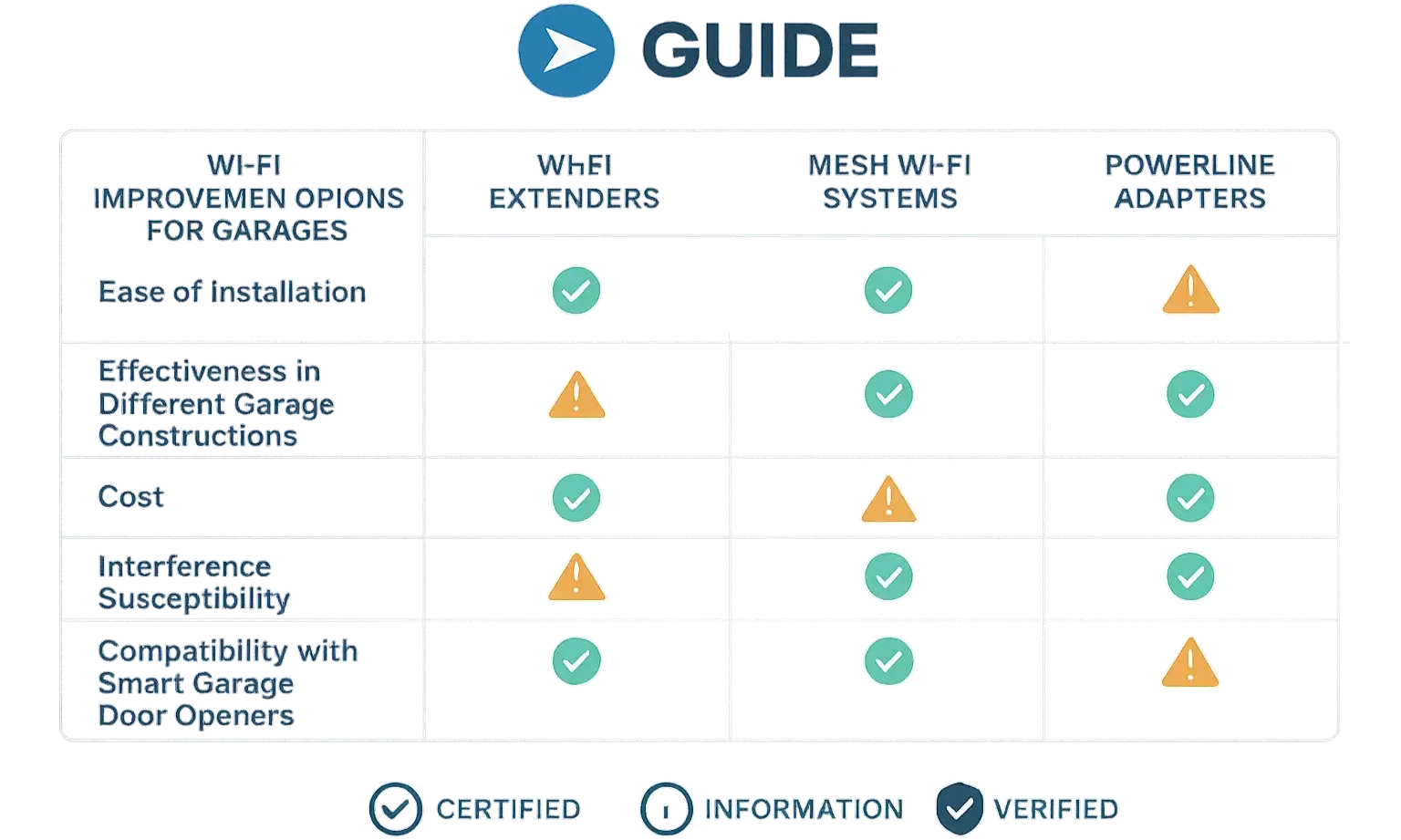
Compare Wi-Fi Extenders, Mesh Systems, and Powerline Adapters side-by-side to choose the best solution for your garage's connectivity challenges.

Tier 2: Hardware Helpers

If the quick fixes don’t solve it, your signal likely needs a dedicated boost. This is where a small hardware investment can deliver a permanent solution. There are several smart garage features that depend on a stable connection, making this a worthwhile upgrade.
Wi-Fi Extender (or Repeater): This is the most common solution. It captures your existing Wi-Fi signal and rebroadcasts it, extending its reach.
Who it’s for: Homes where the garage is just on the edge of the Wi-Fi range.
Pro Tip: Don't place the extender in the garage where the signal is already weak. Place it halfway between your router and the garage to ensure it has a strong signal to repeat.
Mesh Wi-Fi System: This replaces your single router with multiple "nodes" placed around your home, creating a single, seamless, and powerful Wi-Fi network.
Who it’s for: Larger homes or homes with lots of Wi-Fi dead zones, not just the garage. It’s a whole-home solution.
Powerline Adapter: This clever device uses your home's electrical wiring to transmit the internet signal. One adapter plugs in near your router, and the other plugs in in the garage, creating a new Wi-Fi hotspot.
Who it’s for: Homes where the garage is on the same electrical circuit and Wi-Fi extenders aren't effective due to thick walls.

Tier 3: The Pro-Level Options

If you’ve tried the solutions above and still face dropouts, you may have a particularly challenging environment. These advanced options are more involved but virtually guarantee a rock-solid connection.

  • Run an Ethernet Cable: A hardwired connection is the gold standard for reliability. If your smart opener has an Ethernet port, running a cable from your router to the opener will permanently solve any signal issues.
  • Upgrade Your Opener: If your opener is several years old, it might have an older, weaker Wi-Fi antenna. Newer models from brands like LiftMaster and Chamberlain often feature improved Wi-Fi technology designed for better range and more stable connections.
Compare Wi-Fi Extenders, Mesh Systems, and Powerline Adapters side-by-side to choose the best solution for your garage's connectivity challenges.

Need more information?

Your Personalized Action Plan & Next Steps
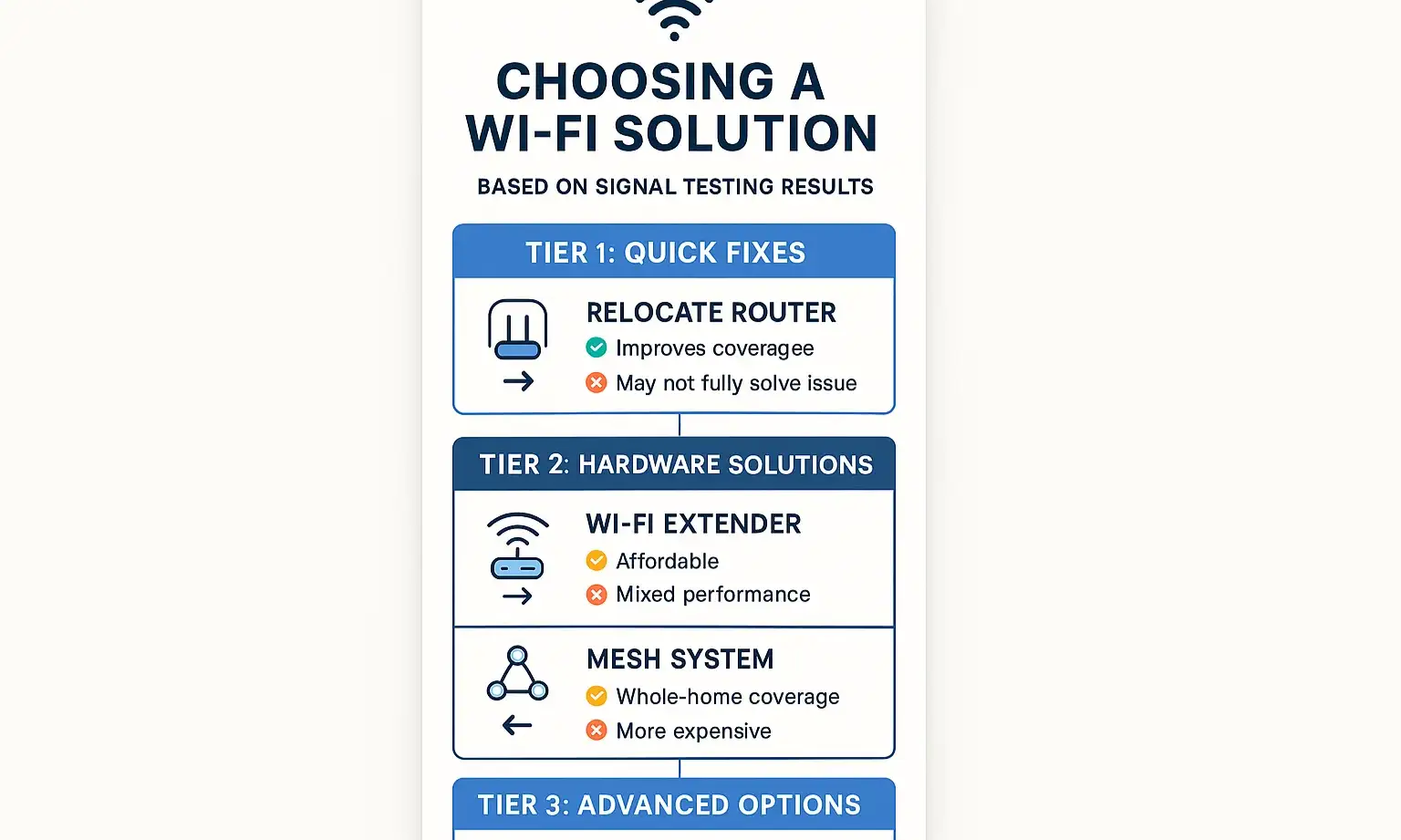

Feeling overwhelmed? Don't be. Just follow this simple action plan to find the right solution for you.
1. Diagnose: Use your phone to test the Wi-Fi signal strength (in dBm) right under your opener.
2. Act Based on Data:
Use this stepwise action plan to confidently select and implement the right Wi-Fi solution tailored to your garage’s unique connectivity challenges.

  • If your signal is -70 dBm or lower: Start with Tier 1. A simple router move might be all you need. If that doesn't work, a Wi-Fi Extender from Tier 2 is your most likely solution.
  • If you have multiple dead zones in your house: A Mesh Wi-Fi System from Tier 2 is a better long-term investment.
  • If your garage has extremely thick walls: A Powerline Adapter from Tier 2 might be more effective than a Wi-Fi extender.
  • If nothing else works: It's time to consider the Pro-Level Options from Tier 3.
Use this stepwise action plan to confidently select and implement the right Wi-Fi solution tailored to your garage’s unique connectivity challenges.

Frequently Asked Questions (FAQ)


Why does my smart opener only connect to 2.4 GHz Wi-Fi?

Most smart home devices, including garage door openers, use the 2.4 GHz band. While the 5 GHz band is faster, 2.4 GHz has a much longer range and is better at penetrating walls—making it more reliable for devices like a garage opener. If your router combines both bands into a single network name, it can sometimes confuse smart devices. You may need to go into your router’s settings and create separate names for them (e.g., "MyHomeWiFi2.4GHz" and "MyHomeWiFi5GHz").

What if a Wi-Fi extender doesn't solve my problem?

This usually happens for one of two reasons: the extender was placed in a spot with too weak a signal to begin with, or the walls are too thick for even the repeated signal to penetrate. If you've tried repositioning the extender and it still doesn't work, a Powerline Adapter or a Mesh Wi-Fi System is your next best bet.

Could my router be the problem?

Absolutely. If your router is more than 5-7 years old, its technology might be outdated and its signal may be weaker than modern routers. An upgrade could solve issues not just in your garage but throughout your entire home.

Is it difficult to run an ethernet cable to my garage?

It depends on your home's layout. It can be a simple DIY project if you're comfortable running cable through walls or along baseboards, or a professional can do it relatively quickly. The benefit is an unbreakable, lightning-fast connection. While it seems like a lot of work, it's a key part of the process for fully automating my garage door with smart technology.
By taking a methodical approach, you can turn your "dumb" smart garage into the reliable, convenient workhorse it was meant to be. A little Wi-Fi detective work today can save you a world of frustration tomorrow.

You may also like


blog photo

The Complete Guide to Power Outage-Proofing Your Garage

It’s a classic scene: a thunderstorm is raging, you’re rushing to leave for an important appointment, and just as you hit the remote, the power cuts out. Your garage door, your main exit, is now a one-ton wall holding you hostage. That sinking feeling of being trapped is an anxiety every homeowner understands. What's your emergency plan for your garage? For most, the plan involves fumbling in the dark for a manual release cord they've never used. But what if there was a better way? What if your garage door could be completely immune to power outages, giving you uninterrupted access and peace of mind, no matter the weather? This guide isn't just another list of products. It’s a complete resource for solving that deep-seated anxiety. We'll explore the technology that makes your garage truly reliable, how to choose the right system, and exactly what to do when the lights go out.

blog photo

A Homeowner's Guide to Smart Garage Security Features

Remember the days of clipping a clunky remote to your car's sun visor? For decades, that was the peak of garage door technology. But just as our phones have evolved into pocket-sized computers, our garages have become a major hub of smart home innovation. Today, your garage door isn't just an entry point; it's a key part of your home's security nervous system. Many of us now use the garage as our primary entrance. It’s where we welcome our families, receive packages, and store valuable belongings. This shift means we need to think differently about garage door protection. A smart garage door opener does more than just open and close on command—it offers a suite of security features designed for modern life. But with so many options, how do you know which ones are right for you? This guide will walk you through the most important security features available today, moving beyond the basic question of "is it safe?" to a more empowering one: "Which features will make my life easier and my home more secure?"

blog photo

How to Choose the Best Smart Garage Door Opener

Upgrading to a smart garage door opener will boost your home’s security and convenience. These new technologies let you control and monitor your garage door from anywhere, giving you peace of mind and ease of use in your smart home. But with so many options, choosing the best smart garage door opener can be tough. This guide will take you through the key things to look for when choosing a smart opener and compare the brands and models available on the market. To help you make a decision, we’ll examine smartphone connectivity, voice control, and security features. We’ll also examine top brands and their best models, carefully weighing all the pros and cons. Contact Up & Down Garage Door if you are struggling to find out how to choose the garage door opener. We will provide any of the requested services, from picking the most suitable model to garage door opener repair.