





Understanding Garage Door Sensor Wire Types
Published: May 7, 2026
You’ve been there. You hit the button on your garage door remote, hear the familiar hum of the motor, but then… it stops. The door reverses, and the lights on your opener start blinking frantically. You check for obstructions, wipe the sensor lenses, but nothing works.
It’s a frustratingly common scenario, and while our first instinct is to blame the safety sensors themselves, the real culprit is often hiding in plain sight: the thin, unassuming wire that connects them. More often than not, it’s not the sensor that has failed, but the cheap, damaged, or incorrect wire that’s causing the communication breakdown.
Think of it like a phone call with bad reception. Your sensors are trying to talk to the opener, but a faulty wire creates static, and the safety message—”All clear!”—never gets through. This guide will help you understand that “reception,” demystifying the wire that is the lifeline of your garage door’s most important safety system.
Foundation: Sensor Wiring 101 - The Language of Wires
Before you can diagnose a problem, you need to speak the language. Garage door sensor wiring isn’t complex, but it relies on a few core principles. Getting these right is the difference between a reliable system and one that fails on a cold, rainy night.
Wire Gauge: The “Thickness” That Matters
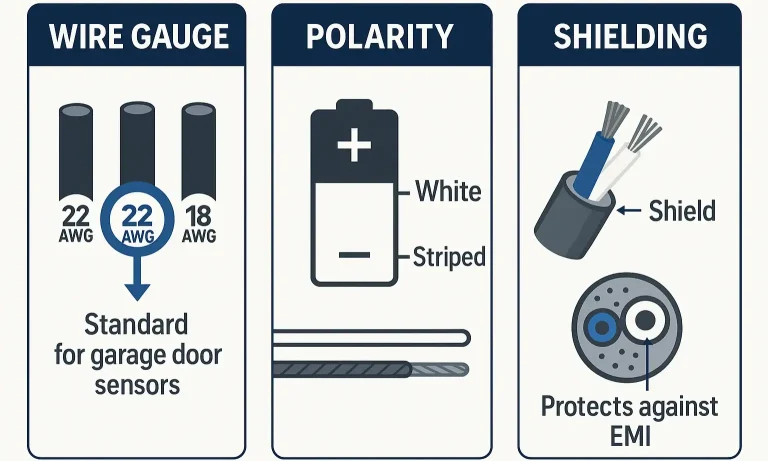
Wire gauge, measured in American Wire Gauge (AWG), refers to the thickness of the copper conductor. The lower the number, the thicker the wire. For most garage door sensors, the standard is 22-gauge, 2-conductor bell wire (22/2). This thickness provides the perfect balance of durability to resist accidental nicks and signal strength for clear communication, without being too bulky for the small terminals on the opener.
Polarity: The “Positive” and “Negative” Connection
This is the concept most guides skip, but it’s the most critical for success. Your sensors need a small amount of power from the opener to function, and this is delivered through a low-voltage DC circuit. Just like a battery has a positive (+) and negative (-) terminal, your sensor wiring has a positive and negative wire.
- The White Wire: This is the negative (-) conductor.
- The White Wire with a Black Stripe: This is the positive (+) conductor.
If you reverse these wires at either the sensor or the opener, the circuit is broken. The sensors won’t receive power, their indicator lights will go out, and your garage door won’t close. It’s that simple. Matching them correctly—white to white, and striped to striped—is non-negotiable.
Shielding: The Pro-Tip Armor Against Interference
Here’s a concept even many technicians overlook. Your garage is full of things that create electromagnetic interference (EMI)—fluorescent lights, power tools, even the opener motor itself. Unshielded wires can act like an antenna, picking up this electrical “noise.” This interference can corrupt the signal from your sensors, leading to maddeningly intermittent issues where the door works one minute and not the next.
Shielded wire has a foil or braided sheath around the conductors that blocks this noise, ensuring a clean signal. While not always required, using it is a professional-level fix for mysterious sensor problems.
Building: The 3 Wires You'll Encounter in the Wild
In a perfect world, every garage would use the standard 22/2 bell wire. But in reality, builders and DIYers often use whatever is on hand. Here’s a look at what you’re likely to find and why it matters.
The Good: Standard Bell Wire (22/2 Gauge)
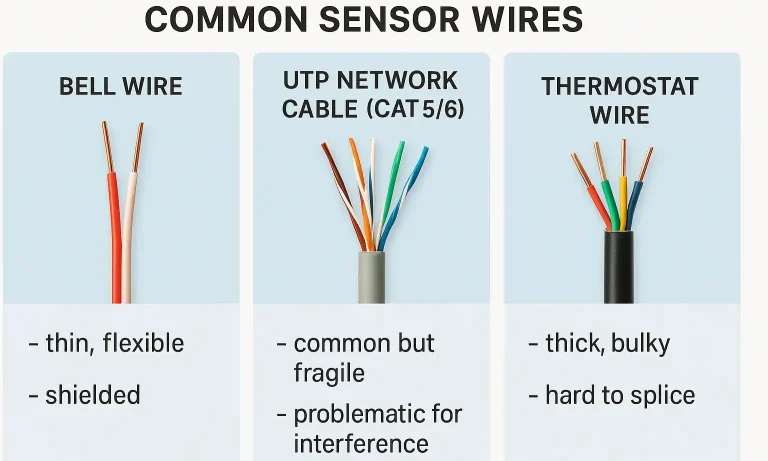
This is the industry standard for a reason. Its two conductors are the right thickness (22 AWG), it’s flexible enough to run easily, and its sheathing is durable enough to withstand the garage environment. If you’re running new wire, this is what you should buy. A proper garage door sensor wire is essential for a reliable system.
The Bad: UTP/Network Cable (Cat5/Cat6)
Often found in newer homes that were pre-wired for networking, this is one of the most common causes of sensor faults. UTP (Unshielded Twisted Pair) cable contains eight very thin, fragile wires. Technicians often find that these tiny strands have broken inside the insulation from being stapled too tightly or simply from years of vibration. While it can work in a pinch (by twisting multiple strands together for each connection), it’s not a reliable long-term solution.
The Bulky: Thermostat Wire (18/4 or 18/5 Gauge)
Another common substitute, thermostat wire is much thicker (usually 18 AWG) and contains four or more conductors. While its thickness makes it durable, it’s also stiff and difficult to work with. The thick copper can be hard to secure in the small quick-connect terminals on modern openers, leading to loose connections that fail over time.
Mastery: How to Wire & Splice Like a Pro
Whether you’re installing a new system or repairing an old one, a clean connection is everything. Following a proper garage door safety sensor wiring diagram is the key to getting it right the first time.
Wiring Basics:
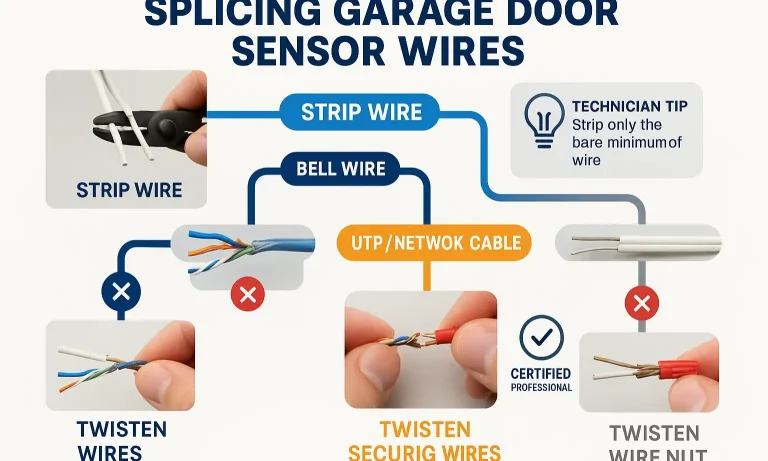
- Strip the Ends: Use a wire stripper to remove about ½ inch of insulation from the white and striped wires.
- Twist the Strands: Tightly twist the exposed copper strands of each wire so no stray “whiskers” are sticking out.
- Connect to the Sensor: Loosen the screws on the sensor terminal, loop the wire around the screw in the direction it tightens (clockwise), and secure it firmly.
- Connect to the Opener: For screw terminals, follow the same process. For quick-connect terminals, press the tab and insert the wire fully before releasing.
Splicing a Broken Wire:
If a wire is cut or damaged, you’ll need to splice it.
- Cut Out the Damage: Remove the frayed or broken section of the wire.
- Strip All Four Ends: Strip the insulation from the two ends on each side of the break.
- Connect Polarity: Twist the white wire from one side to the white wire from the other. Do the same for the striped wires.
- Secure the Connection: Use wire nuts or insulated crimp connectors to secure each splice. Never just wrap them in electrical tape, as this can easily come loose.
Action: The 60-Second Troubleshooting Checklist
When your door won’t close, run through this quick checklist before you do anything else. This process can help you diagnose if you have failing garage door sensors or simply a wiring issue.
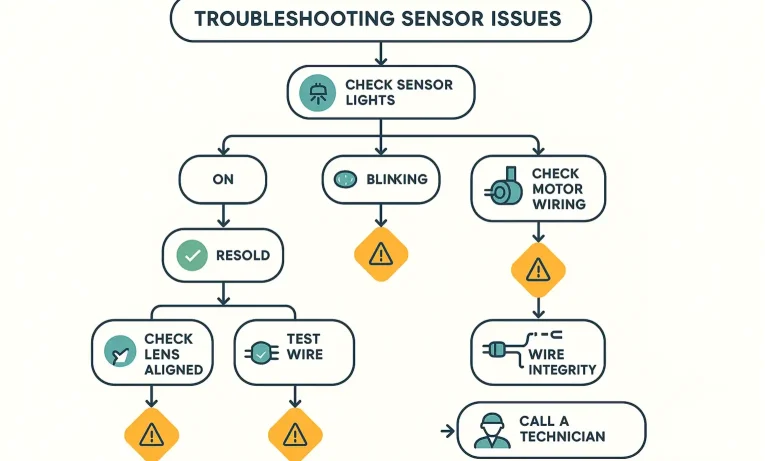
- Check the Sensor Lights: Are the LEDs on both sensors lit? A sending sensor usually has an amber light, and the receiving sensor has a green light. If one or both are off, you have a power issue—likely a cut wire or a bad connection.
- Is a Light Blinking? A blinking light on the receiving sensor means it’s not seeing the sender’s beam. This is usually an alignment issue.
- Check Alignment: Ensure the sensors are pointing directly at each other. Nudge them into place until both lights are solid.
- Clean the Lenses: Wipe both sensor “eyes” with a soft cloth to remove any dust, cobwebs, or grime.
- Inspect the Connections: Gently tug the wires at the back of each sensor and at the motor head. Do any feel loose?
- Walk the Wire: Visually inspect the entire length of the wire from sensor to opener. Look for damage from staples, kinks, or signs of being chewed by pests.
Frequently Asked Questions (FAQ)
What is the correct gauge for garage door sensor wires?
The industry standard and recommended size is 22-gauge, 2-conductor bell wire (often written as 22/2 AWG). This provides the best balance of signal strength and durability for this application.
What do the white and black-and-white wires mean?
This is for polarity. The solid white wire is the negative (-) conductor, and the white wire with a black stripe is the positive (+) conductor. They must be connected to the corresponding terminals on both the sensor and the opener for the system to work.
Can I use telephone or speaker wire for my sensors?
It’s highly discouraged. These wires often use extremely thin conductors that break easily and are not designed to carry a stable power signal over distance, leading to poor reliability and intermittent faults.
Are all garage door sensors and their wires the same?
While the underlying principle is similar, the question “are garage door sensors universal” is a common one. Different brands may use different connectors or have slight variations. It’s always best to use the wire type recommended by your opener’s manufacturer.
When the Wire Isn't the Problem
Understanding the wire that powers your garage door sensors empowers you to solve one of the most common—and frustrating—issues a homeowner can face. By choosing the right gauge, respecting polarity, and ensuring clean, tight connections, you can build a safety system that’s as reliable as it is essential.
If you’ve checked your wiring from end to end and are still facing issues, it may be time to look at the sensors themselves or the opener’s logic board. For those moments when a DIY fix isn’t enough, remember that help is available. Our team of trained technicians is always ready to diagnose and resolve any garage door issue, ensuring your system is safe, secure, and working perfectly.
You May Also Like
How To Wire Garage Door Sensors: Wiring Guide for Safety
Your garage door safety sensors help protect your family, pets, and property by stopping the door from closing when something’s in the way. If they aren’t working properly, your door may refuse to close — or worse,…
Published Date: Nov 12, 2025
A Guide to Intermittent Garage Door Sensor Failure
It’s one of the most maddening homeowner mysteries. Your garage door works perfectly for weeks, then one sunny afternoon, it refuses to close. You check for obstructions, see nothing, try again, and it works. The…
Published Date: Jan 22, 2026
How to Fix the Orange Light on a Garage Door Sensor
Seeing an unfamiliar light on your garage door system can be confusing. If you’ve noticed the orange light on a garage door sensor, it usually means the sending sensor has power, but the receiving one isn’t picking…
Published Date: Nov 24, 2025