Smart Garage Door Compatibility Guide: Alexa, Google Home & HomeKit
Published: Feb 3, 2026
Ever had that moment? You've just bought a new smart gadget, excited to connect it to your smart home, only to hit a wall of confusing compatibility charts and technical jargon. If you're trying to figure out if a smart garage door opener will play nice with your Alexa, Google Home, or Apple HomeKit setup, you're in the right place.
The good news is that it's not as complicated as it seems. The secret is understanding what we call the "Compatibility Triangle"—the three key pieces that must connect perfectly for everything to work.
Let's break down each point of that triangle so you can make your garage smarter, without the headache.
Foundation: The 3 Things You Must Know Before You Buy
Before you add anything to your online cart, you need to be a detective in your own garage. Getting these three pieces of information right will save you time, money, and frustration.
Part 1: Your Existing Garage Door Opener (Brand, Learn Button Color)
For most people, you don't need a brand-new opener motor. You just need to know if your current one can be upgraded. The single most important clue is the "learn button." This is the small button you press to program new remotes. Its color tells you almost everything you need to know about the technology inside your opener.
You can usually find the learn button on your garage door opener on the back or side of the motor unit, sometimes hidden under a light cover.
- Purple, Red, or Orange Button: These openers typically use an older, but very common, security technology. Most smart controllers are designed to work with them.
- Yellow Button: This signifies a more modern system, like Chamberlain's Security+ 2.0. This technology is more secure, but it can also be more restrictive, so you need to ensure a smart controller explicitly states it's compatible with the yellow learn button.
- Green Button: This is another common older technology that is widely compatible with smart add-on devices.
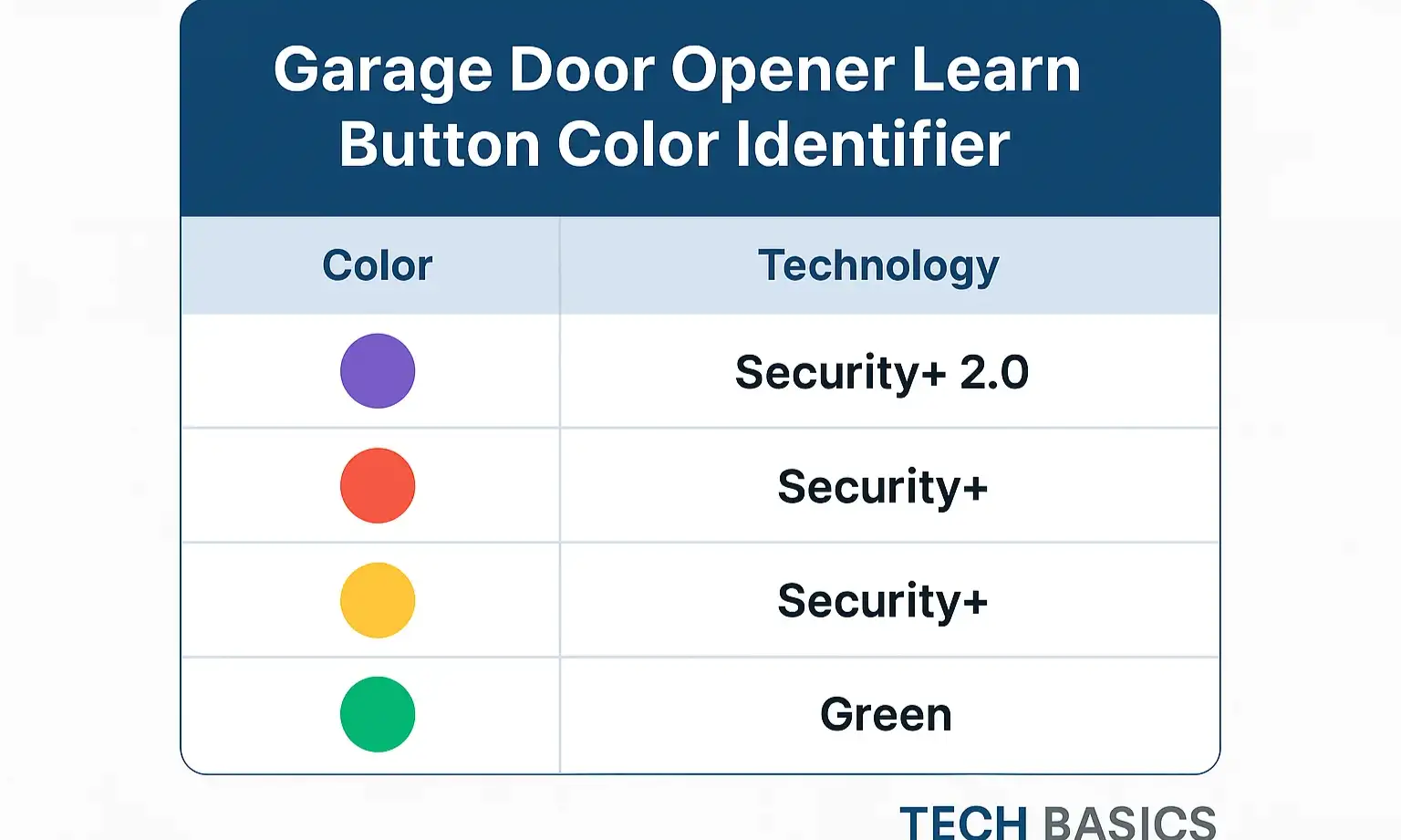
Knowing your opener's brand (like LiftMaster, Chamberlain, or Genie) and this button color is the first and most critical step.
Part 2: The Smart Controller Add-on vs. a New Smart Opener
Once you know what kind of opener you have, you have two paths to smart garage door automation:
- Smart Controller Add-on: This is the most popular choice. It's a small device (like the Chamberlain myQ Smart Garage Control or a Meross Smart Wi-Fi Garage Door Opener) that wires into your existing opener motor. It acts as a bridge, connecting your old-but-reliable opener to your home's Wi-Fi network.
- New, Integrated Smart Opener: If your opener is very old or you're looking for an upgrade anyway, you can buy a brand-new unit with all the smart technology built right in.
For most homeowners, an add-on controller is the perfect solution. If you're considering a full replacement, it's worth exploring how to choose the best smart garage door opener for your specific needs.
Part 3: Your Smart Home Ecosystem
Finally, which team are you on?
- Amazon Alexa: Known for its wide compatibility and popular Echo devices.
- Google Home (Google Assistant): Praised for its conversational intelligence and integration with Nest products.
- Apple HomeKit: Valued for its strong focus on security, privacy, and seamless integration with Apple devices.
Your choice of ecosystem will be the final filter for determining which smart controller is right for you.
The Ultimate Compatibility Guide: Connecting Your System
Now that you have your foundational knowledge, let's connect the dots and see which products work with which platforms.
Amazon Alexa & Google Home: The Broadly Compatible Duo
Good news for most users: if you live in the Alexa or Google Home world, your options are wide open. The vast majority of smart garage controllers are built to work with these two platforms right out of the box.
Top Controllers:
- Chamberlain/LiftMaster myQ: As the market leader, myQ offers robust integration. You can ask Alexa or Google to check the status of your door or close it. (Note: Opening with Google Assistant may require a subscription fee).
- Meross: A very popular and affordable option known for its simple setup and reliable performance with both platforms.
- Tailwind: A more advanced option that uses a vehicle sensor for true automatic opening and closing, with excellent Alexa and Google support.
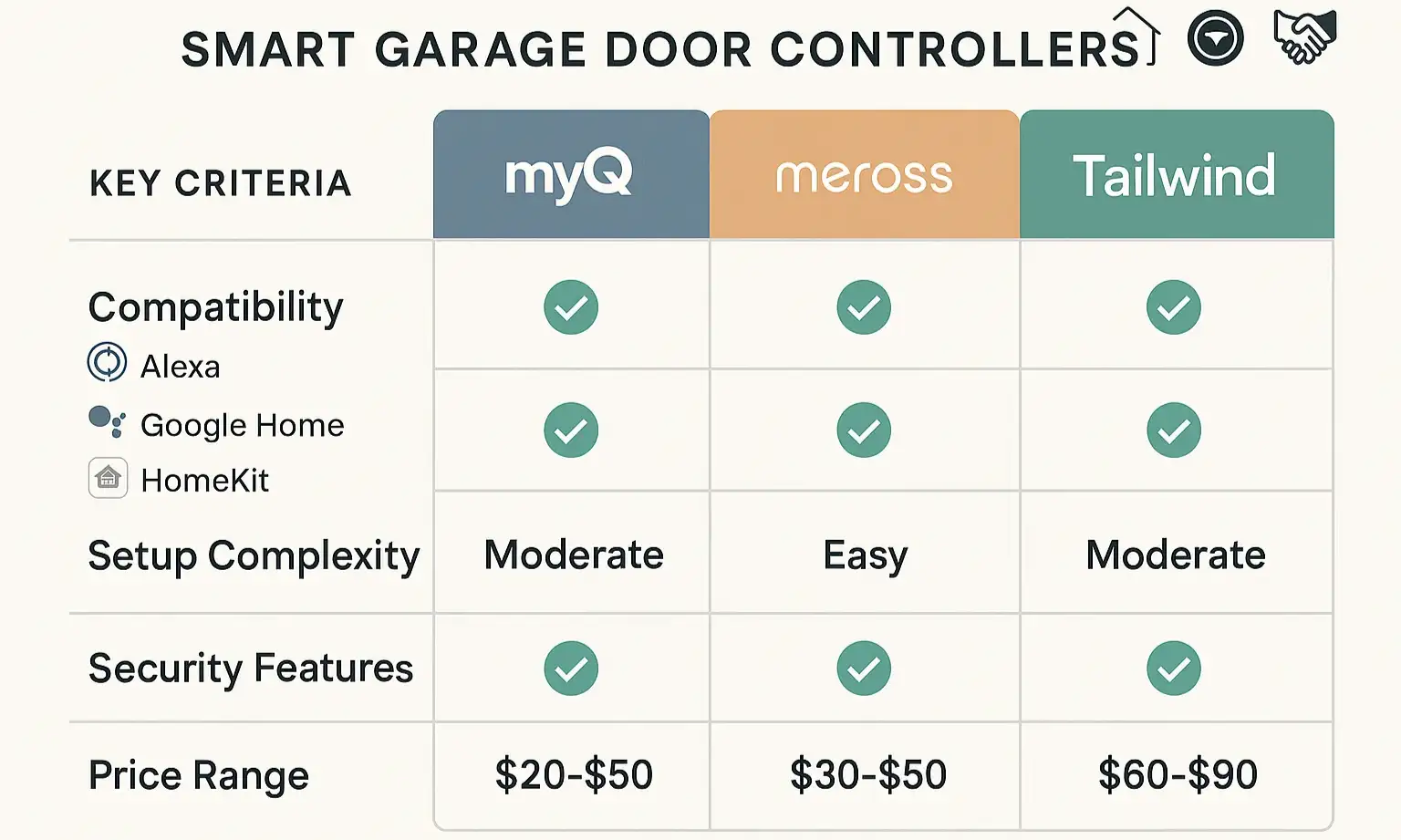
Setting them up is typically straightforward, often involving a simple smart garage door opener installation of the controller and then linking your account in the Alexa or Google Home app. Soon, you'll be able to open your garage door with your phone and your voice.
Apple HomeKit: The Special Case (And the MyQ Story)
If you're an Apple user, this is where you need to pay close attention. HomeKit compatibility is more stringent due to Apple's security requirements, and the landscape has changed significantly.
The MyQ and HomeKit Breakup: What Happened?
For years, many users connected their myQ devices to HomeKit using a separate piece of hardware called the "myQ Home Bridge." However, in a major industry shift, Chamberlain discontinued this product and actively blocked access for many third-party workarounds. This left thousands of HomeKit users searching for a solution. While the official reasons point to evolving security standards, it created a major gap in the market.
Your Best HomeKit Options Today:
- Native HomeKit Controllers (The Easiest Path): The simplest solution is to buy a controller with official, built-in HomeKit support. The Meross Smart Wi-Fi Garage Door Opener is currently the most recommended choice for this, offering a direct, reliable connection without any extra hardware.
- Community-Approved Workarounds (For the Tech-Savvy): If you're technically inclined, you can use software like Homebridge. This is a lightweight server you can run on a computer in your home (like a Raspberry Pi) that acts as a bridge for non-HomeKit devices. It's a powerful tool but requires a bit more setup. Some enthusiasts have also found success with alternative hardware like ratgdo.
The "Aha" Moment for HomeKit Users: Do not buy a standard myQ controller expecting it to work with HomeKit. To avoid frustration, either choose a device with native HomeKit support or be prepared to go the Homebridge route.
Need more information?
Get a free quote
Beyond Connection: Troubleshooting & Smart Routines
Getting connected is just the first step. Here's how to solve common issues and unlock the true potential of your smart garage.
Why Isn't My Opener Connecting? Common Roadblocks
- Weak Wi-Fi in the Garage: Garages are often Wi-Fi dead zones. Before you install anything, check the signal strength with your phone. You may need a Wi-Fi extender.
- Security+ 2.0 Issues: If you have that yellow learn button, double-check that your smart controller is compatible. Not all are.
- Sensor Problems: A smart controller won't override safety sensor issues. If your sensors are misaligned, you may need to reset your garage door sensors before you can automate the door. If you're struggling, it may be time to call a professional to repair your garage door opener.
The Real Magic: Creating Smart Routines
The true benefit of a smart garage comes from automation. Think beyond just asking Siri to open the door. Consider setting up routines like:
- "Alexa, I'm leaving": A routine that closes the garage door, turns off all the lights, and adjusts the thermostat.
- "Hey Google, Goodnight": A command that checks to ensure the garage door is closed as part of its nightly lockdown sequence.
- Location-Based Automation (Geofencing): Have the garage door automatically open when you pull into the driveway.
These automated sequences are some of the best smart garage door opener features and benefits, transforming a simple remote into a truly integrated part of your home.
Frequently Asked Questions (FAQ)
How can I tell if my garage door opener is Wi-Fi compatible?
Most older garage door openers are not Wi-Fi compatible on their own. You can tell by checking for a Wi-Fi logo or "myQ" logo on the motor unit. If it's not there, you'll almost certainly need a smart controller add-on to connect it to your network.
What's the difference between a smart controller and a whole new smart opener?
A smart controller is a small, affordable device that wires into your existing opener motor, making it "smart." A new smart opener is a complete motor replacement that has all the smart technology and Wi-Fi capabilities built-in from the factory.
Why are some brands incompatible with my smart home system?
Compatibility issues usually come down to two things: business decisions or security protocols. For example, the MyQ/HomeKit split was a business decision. In other cases, an opener's specific security technology (like Security+ 2.0) may not be supported by a generic smart controller.
Is it hard to install a smart garage door controller?
For most DIY-savvy homeowners, installation is straightforward and takes under an hour. It typically involves mounting the controller, attaching two wires to the same terminals your wall button uses, and positioning a sensor on the door itself. However, if you're not comfortable with wiring or ladders, a professional can handle it quickly.
Navigating the world of smart home tech can feel overwhelming, but understanding these core principles of compatibility puts you in control. By identifying your existing hardware and knowing the landscape of your chosen smart ecosystem, you can add a new level of convenience and security to your home.
You may also like