





Setting Up Temporary Garage Door Access Codes for Deliveries or Guests
Published: May 4, 2026
Ever found yourself in a tricky situation, needing to give someone access to your garage? Maybe the dog walker is coming while you’re at work, a contractor needs to drop off materials, or you have a much-anticipated package delivery arriving during your lunch meeting. The old solutions—leaving the door unlocked or sharing your personal, permanent code—feel like choosing between inconvenience and a major security risk.
What if there was a better way? A way to grant secure, limited access without compromising your home’s main entry point.
This is where temporary garage door codes come in. They are a simple, often underutilized feature of most modern garage door openers that can revolutionize how you manage access to your home. This guide will walk you through everything you need to know, from understanding the basics to setting up a code on your specific brand of opener.
Foundation: Core Concepts Simply Explained
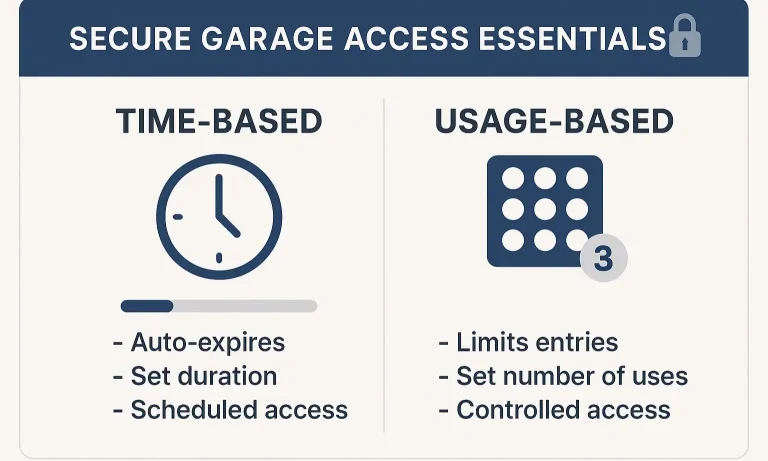
Before we jump into the “how-to,” let’s have a quick coffee-chat about what these codes are and why they’re such a game-changer for home security. A temporary code is exactly what it sounds like: a separate PIN for your garage door keypad that works for a limited time or a limited number of uses. Instead of giving out your family’s private code, you create a disposable one for specific situations.
This immediately improves your garage door protection by ensuring your primary PIN remains confidential. There are two main flavors of temporary codes, and choosing the right one depends on your needs.
Two Types of Temporary Access: Time vs. Usage
- Usage-Based Codes: This is a “one-and-done” code. It’s programmed to work for a specific number of times—usually just once. It’s the perfect solution for a single delivery or granting one-time entry to a repair person. Once they use the code to enter and leave, it deactivates.
- Time-Based Codes: This type of code works for a set duration. You can program it to be active for a few hours or even several days. This is ideal for house guests staying over the weekend or a pet sitter who needs access for a full week. Once the time limit expires, the code automatically stops working.
Choosing the right type of code gives you precise control over who enters your home and when, all without the hassle of changing your main code after every visitor.
Building: The How-To (Master Section)
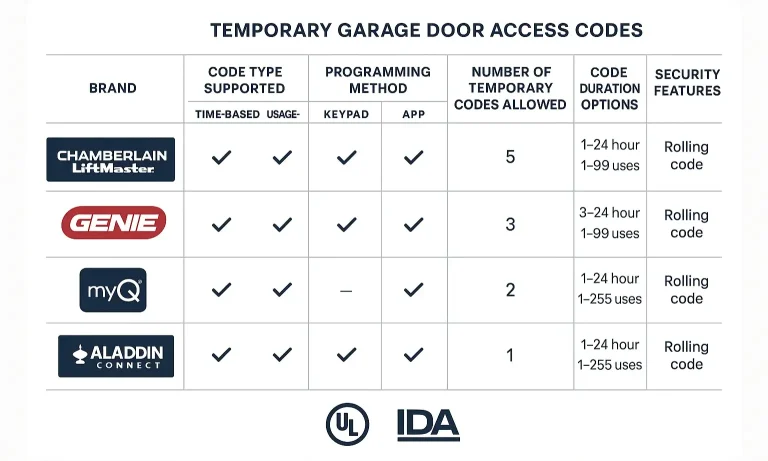
Alright, now for the practical part. While the exact steps can vary by brand, the core process is surprisingly similar across most models. Generally, it involves putting your opener into a programming mode and then entering the temporary PIN on your keypad. If you’re new to this, it might be helpful to review the basics of how to reset a garage door keypad to familiarize yourself with the components.
Let’s break down the process for the most common brands.
The Universal Starting Point: The “Learn” Button
Nearly every garage door opener has a “Learn” or “Program” button. It’s usually a small, square button on the motor unit itself (the part hanging from your garage ceiling). You may have to remove a light cover to find it. The color of this button is often a key identifier for your model (e.g., purple, red, orange, or green).
Brand-Specific Instructions
For Chamberlain, LiftMaster & Craftsman (with “Smart/Learn” Button)
These brands are all part of the Chamberlain Group and typically share similar programming steps.
To Set a Usage-Based PIN (Number of Uses):
- Press * and # on the keypad until the keypad lights stop flashing.
- Enter your current 4-digit master PIN and press #.
- Press 1 and then press #.
- Enter the new 4-digit temporary PIN you want to use and press #.
- Enter the number of times you want the code to work (1-255) and press #. The keypad light will blink to confirm.
- Press the “Learn” button on the motor unit until the indicator light blinks.
- On the keypad, enter the new temporary PIN (3-8 digits).
- Press the Up/Down key on the keypad. The light on the motor should turn solid.
- Press the Up/Down key again. The light will go out, confirming the PIN is set.
To Set a Time-Based PIN (Duration):
- Follow steps 1-3 above.
- Press 2 and then press #.
- Enter the new 4-digit temporary PIN and press #.
- Enter the number of hours you want the code to work (1-255) and press #. Confirmation is a blinking light.
For Genie & Overhead Door (Intellicode Models)
Genie’s process is a bit different and usually involves the opener’s “Learn” button.
⚠️ Don’t Forget! The exact steps can vary slightly by model. If these instructions don’t work, your owner’s manual is the ultimate source of truth. If you’re having trouble with the initial setup, our guide on how to program a garage door keypad offers more detailed, general instructions.
Mastery: Advanced Applications & Smart Home Integration
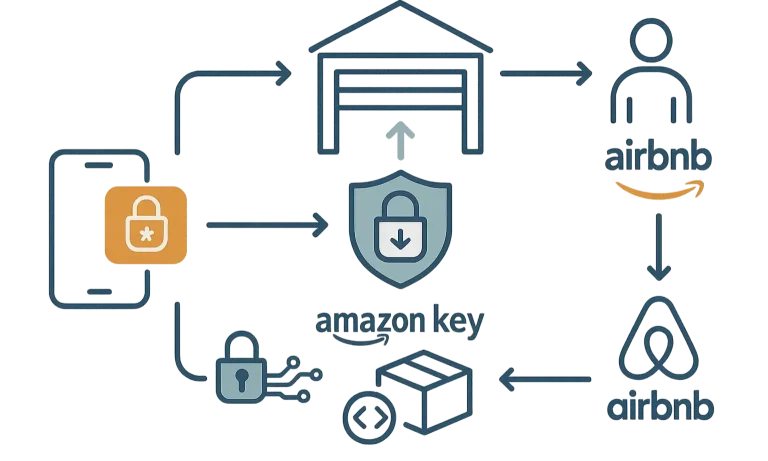
Temporary codes aren’t just for keypads anymore. The rise of smart home technology has made managing guest access even easier and more powerful. If you have a Wi-Fi-enabled opener, you likely have access to an app (like MyQ for Chamberlain/LiftMaster or Aladdin Connect for Genie) that lets you manage codes from anywhere.
Smart Access Scenarios:
- Amazon Key In-Garage Delivery: Services like this integrate directly with your smart garage opener. You can authorize Amazon to grant their delivery drivers one-time, verified access to place packages securely inside your garage. You get notifications when the door opens and closes, adding a layer of transparency.
- Airbnb/VRBO Guests: Hosting a short-term rental? You can create a unique code for each guest that is only active during their stay. Set it to activate at check-in and expire at check-out, all from your phone. No more worrying about lost keys or shared codes.
- On-the-Fly Access: A family member drops by unexpectedly while you’re out? You can create a temporary code for them in seconds using the app, no matter where you are.
Investing in one of the best smart garage door openers unlocks this next level of convenience, allowing you to control and monitor your garage access with a tap on your screen.
Action: Troubleshooting & Security FAQ
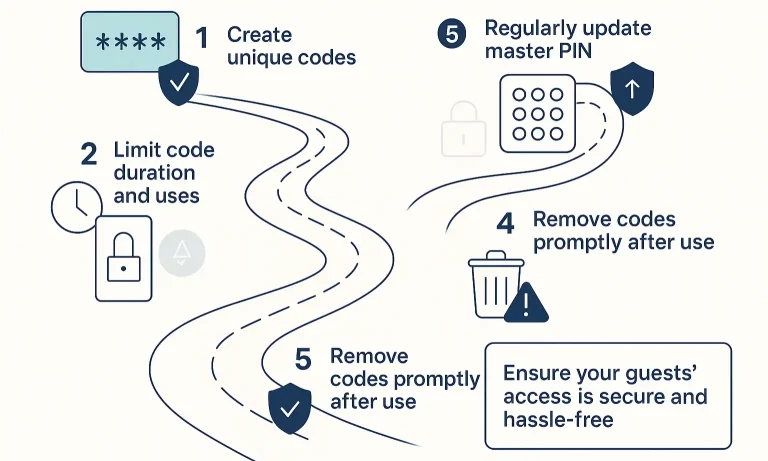
As with any home technology, you might have some questions. Let’s address the most common ones to ensure you feel confident and secure using temporary codes.
How do I delete a temporary code?
For most keypads (like Chamberlain/LiftMaster), you can clear a temporary PIN by repeating the setup process but entering 0 for the number of uses or hours. For app-based systems, you can simply delete the guest profile or code from the user management screen. If all else fails, a full reset is an option. Learning how to reset garage door code completely can give you a fresh start, but be aware this will erase all codes, including your master PIN.
What if the temporary code doesn’t work?
First, double-check that the code was entered correctly. Keypads can be finicky. Ensure the time limit or usage count hasn’t already expired. If it’s a new setup, run through the programming steps again—it’s easy to miss a final # or * press that saves the code.
Are temporary codes really secure?
Yes, they are significantly more secure than sharing your primary code. Modern openers use rolling code technology, which prevents thieves from capturing your code. The biggest risk isn’t hacking; it’s human error. Never use an easy-to-guess PIN (like 1234) and always delete codes after they’re no longer needed. The fundamental rule is to be disciplined about when you change your garage door code and who has access.
What if my opener doesn’t support temporary codes?
Older models may lack this feature. If your opener doesn’t support temporary PINs, you have a couple of great alternatives. You could upgrade to a modern keypad that has the feature built-in or consider installing a universal smart garage hub. These devices connect to your existing opener and allow you to control it from an app, effectively giving you all the smart features—including guest access—without replacing the entire motor. It’s a great way to add a modern keyless garage door lock system to an older setup.
Take Control of Your Home Access
You now have the knowledge to move beyond simply opening and closing your garage door. By mastering temporary access codes, you’re adding a powerful layer of both convenience and security to your daily life. You can welcome guests, receive deliveries, and manage service appointments with peace of mind, knowing your main access point is always secure.
If you find that your current system is outdated or if you’re interested in exploring the latest in smart garage technology, our team is always here to help. At Up & Down Garage Doors, we believe in empowering homeowners with the right tools and knowledge to make their homes safer and smarter.
You May Also Like
How To Change Garage Door Code
Changing your garage door code might not seem to be a priority. However, even the smallest details matter when it comes to keeping your home safe and secure. That’s why taking care of your garage door's functionality…
Published Date: Aug 22, 2024
5 Reasons to Reset Your Garage Door Code | How to Reset Without a Code
Your garage door code is not simply a code for easy entry — but it’s also your security guarantee. Periodically, there might come a time for a garage door code reset. In this post, we’ll consider five persuading…
Published Date: Oct 11, 2024
How to Change a Code on a Garage Door Opener: Secure Your Access Fast
Moved into a new home? Shared your garage code during a renovation? Misplaced a remote? These are the kinds of situations when updating your garage door access code becomes a smart move. If you know how to change a…
Published Date: Jul 25, 2025