





Deactivating Wi-Fi Enabled Openers and App Access
Published: May 11, 2026
You’ve installed a smart garage door opener, and you love the convenience of opening it from your phone. But now you’re facing a new situation. Maybe you’re selling your house, you just upgraded your Wi-Fi router, or a recent security notification has you thinking twice about all your connected devices.
Suddenly, you’re asking questions like, “How do I make sure the new homeowners can’t see my app history?” or “Why won’t my opener connect to my new Wi-Fi?”
You’re in the right place. This guide is your go-to resource for managing your smart garage door’s connectivity. We’ll walk you through not just how to disconnect your device, but more importantly, why and when you should do it.
Foundation: Understanding Your Connected Garage
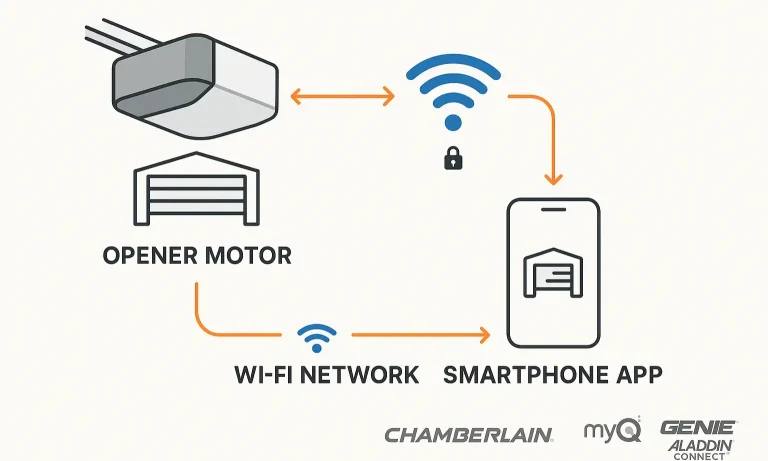
Before diving into the “how-to,” let’s quickly get on the same page. Your smart garage system is a team of three components working together:
- The Opener Motor: The physical unit on your ceiling that lifts the door. It has its own radio receiver for traditional remotes and a Wi-Fi chip to talk to your home network.
- Your Home Wi-Fi Network: The bridge that connects your opener to the internet.
- The Smartphone App: Your command center (like myQ or Aladdin Connect) that sends signals through the internet to your opener.
When you tap “open” on your phone, the signal travels through the internet to your router, which then tells the opener motor what to do. Understanding this relationship is the first step to managing it effectively.
Building: The "Why" - Key Reasons to Manage Your Connection
Managing your opener’s connection isn’t just for troubleshooting. It’s a key part of digital home security and lifecycle management. Here’s why it matters.
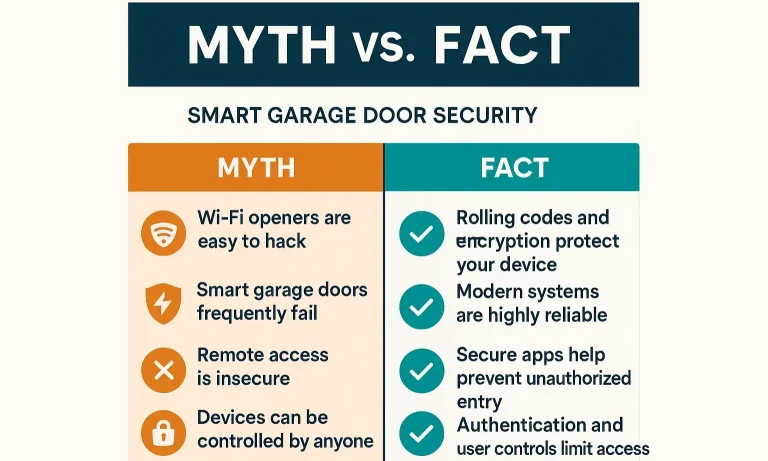
Security First: Smart Garage Myths vs. Facts
There’s a lot of chatter about the vulnerabilities of smart home devices. Let’s separate fact from fiction.
Myth: Wi-Fi garage doors are easy for hackers to open from the street.
Fact: Modern smart openers use sophisticated encryption and “rolling code” technology. Each time you use your remote or app, it sends a new, unique code. This prevents thieves from capturing your signal and replaying it later. The technology is incredibly secure at the device level.
Myth: My opener is the weakest link in my home security.
Fact: The biggest vulnerability isn’t the opener itself, but the network it’s connected to. A weak Wi-Fi password or a compromised home network is the most likely entry point for any bad actor. Securing your network is the single most important step in protecting all your smart devices. Understanding the full range of smart garage door security features available can provide even greater peace of mind.
Practical Scenarios: When to Disconnect
Beyond security, there are several common situations where you’ll need to reset or remove your opener’s Wi-Fi connection:
- Selling Your Home: You must completely sever the link between the opener and your personal accounts to protect your privacy and give the new owner a clean slate.
- Changing Your Wi-Fi Router or Password: The opener won’t automatically find your new network. You need to wipe its memory of the old network and teach it the new one.
- Troubleshooting Connectivity: If your opener frequently goes offline or becomes unresponsive in the app, a full reset of its network settings is often the quickest fix. This is a common first step in any DIY garage door opener troubleshooting.
- Managing Tenant or Guest Access: If a renter moves out, you need to ensure their app access is revoked completely by clearing the device and re-registering it to yourself.
Mastery: The "How" - A Step-by-Step Guide for Every Scenario
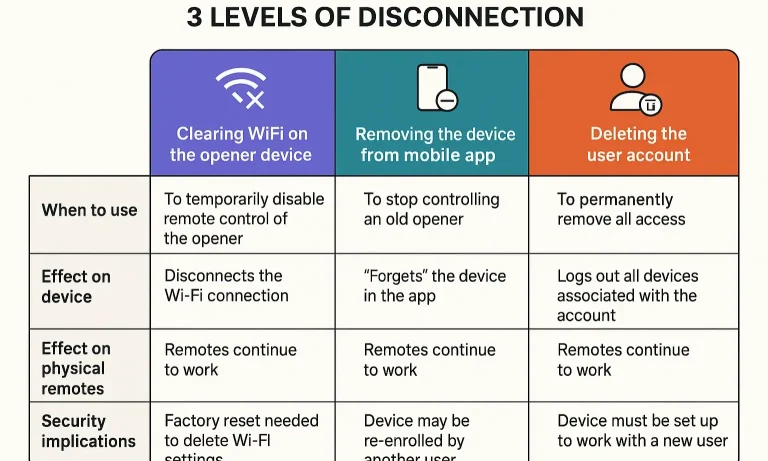
Here’s the “aha moment” for most users: disconnecting your smart opener isn’t a single action. There are three distinct levels of disconnection, and choosing the right one depends on your goal.
The 3 Levels of Disconnection: What’s the Difference?
Understanding these options will save you time and prevent security oversights.
The first level is Clearing Wi-Fi on the Opener. This erases the saved network name and password from the motor’s memory. While the opener stays in your app, it will appear as “offline.” This is the best approach when you are simply changing your router or troubleshooting basic connectivity issues.
The second level is Removing the Device from the App. This deletes the opener from your account’s dashboard, though the motor may still remember old network credentials. This is the correct step if you are removing a device you no longer own, preparing to sell your home, or starting fresh after deep troubleshooting.
The third level is Deleting Your Account. This is a permanent action that wipes your user profile, all associated devices, and your entire history with the service (such as myQ or Aladdin Connect). You should only do this if you no longer own any smart devices from that brand.
Action 1: How to Clear Wi-Fi Settings on Your Garage Door Opener
This action forces the opener to forget your home network so you can start over.
To begin, locate the “Learn” or “Adjustment” Button. On most Chamberlain, LiftMaster, and Genie models, this is a square or round button on the side or back of the motor unit, usually found near a small LED light.
Once located, Press and Hold the button for about 6–10 seconds. You must then Wait for Confirmation, which is typically a beep or a flashing LED. The Wi-Fi light will likely start blinking (often blue or green), indicating the settings are erased and it is back in pairing mode.
Common Mistake: Simply changing your Wi-Fi password will not automatically update your opener. You must clear the old settings on the motor first. If problems persist, you may need to fully reset your garage door opener to resolve deeper software conflicts.
Action 2: How to Remove the Opener From Your App
This action removes the device from your account so it is no longer associated with your identity.
First, Open the App (such as myQ or Aladdin Connect) on your smartphone. Navigate to Device Settings by looking for a menu option like “Device Management,” “Hubs,” or an icon of your garage door.
Next, Select the Device you wish to remove and Find the Delete Option. In the settings menu, look for “Delete,” “Remove Device,” or a trash can icon. Finally, Confirm the action when prompted. The device will disappear from your dashboard, ensuring you can no longer control that specific garage door with your phone.
Action: FAQ & Quick Reference
Now let’s put it all together with a practical checklist and answers to common questions.
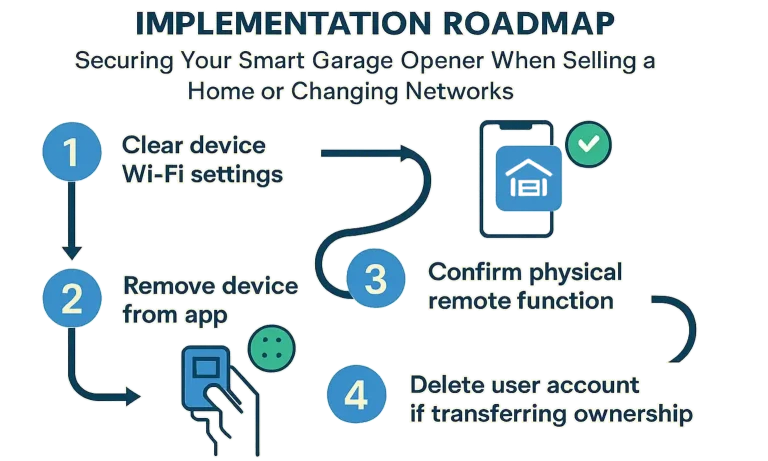
The “Selling Your Home” Security Checklist
Transferring ownership of a smart garage opener requires a specific sequence of steps to ensure a secure and clean handover.
- Clear All Remotes: Before touching the Wi-Fi, reset the opener’s primary memory to erase all paired physical remotes and keypads.
- Clear the Wi-Fi: Follow the steps in “Action 1” to wipe the network settings from the motor unit.
- Remove from App: Follow the steps in “Action 2” to delete the device from your personal account. This is the most critical step for your privacy.
- Leave the Manual: Provide the new homeowner with the opener’s instruction manual so they can set it up on their own account.
- (Optional) Delete Your Account: If this was your only device from that manufacturer, go into the app’s settings and delete your account entirely for a complete digital exit.
Frequently Asked Questions
Will my regular remotes and wall panel still work if I turn off the Wi-Fi?
Yes, absolutely. Your physical remotes and the wired wall panel communicate with the opener via a separate radio frequency. They are not dependent on the Wi-Fi connection and will continue to function normally.
Can I make my old, non-smart garage door opener smart?
In many cases, yes. You can use a smart garage hub or adapter, which acts as a bridge between your existing opener and your Wi-Fi network. Checking a smart garage door opener compatibility guide is the best way to see if your model is supported.
What do the different blinking Wi-Fi lights on the opener mean?
While it varies by brand, a common pattern is:
- Blinking Blue: Ready to be paired with a Wi-Fi network.
- Solid Green: Connected to your Wi-Fi network and the internet.
- Blinking Green/Blue: Attempting to connect.
- Solid Red: Connection error.
Is it possible for someone to hack my garage door opener?
While no device is 100% un-hackable, the security protocols in modern openers make them extremely difficult to breach directly. The most significant risks come from poor password practices on your app or an unsecured Wi-Fi network. Broader vulnerabilities, like weaknesses in the garage door frame security, are often a more practical concern for home security.
Taking Control of Your Smart Home
Your smart garage door opener is a powerful tool for convenience and security. By understanding how to manage its connectivity, you empower yourself to handle any situation—from a simple router upgrade to the major life event of selling your home. You now have the knowledge to keep your home accessible to you and secure from everyone else.
If you ever run into issues or feel that a professional touch is needed, don’t hesitate to reach out. Our team of licensed technicians is available 24/7 to help with any garage door needs.
You May Also Like
Deactivating Your Garage Door Opener During a Power Outage
The power goes out. The garage door opener is dead. Your car is trapped inside, and you need to get out. Or maybe the opener is making a grinding noise, and the door is stuck halfway open. It’s a stressful situation…
Published Date: May 8, 2026
How to Deactivate a Garage Door Opener for Security or Maintenance
Whether you’re heading out of town, updating your garage system, or dealing with a malfunctioning remote, sometimes it’s best to temporarily deactivate a garage door opener. While many people associate garage opener…
Published Date: Aug 8, 2025
Optimizing Wi-Fi Connectivity for Smart Garage Door Openers
You tap the app to close your garage door from the office, but it spins endlessly. You pull into the driveway after a long day, ready for the magic of your garage opening automatically, but nothing happens. The…
Published Date: Mar 20, 2026