





Troubleshooting Short Range on Brand New Garage Door Openers
Published: Apr 27, 2026
There’s nothing more satisfying than hitting the remote and watching your brand-new garage door opener glide into action. And there’s nothing more frustrating than when it only works when you’re five feet away from the door.
You followed the instructions. Everything is shiny and new. So why does your opener have the range of a TV remote from the 90s?
You’re in the right place. This isn’t your typical troubleshooting guide for old, worn-out openers. We’re focusing exclusively on the baffling problem of poor range right out of the box. The good news is that the culprit is usually a simple setup oversight or a “signal killer” hiding in plain sight—not a defective unit.
Let’s walk through it together, just like a friend would over a cup of coffee.
Foundation: The 3-Step Sanity Check for New Installations
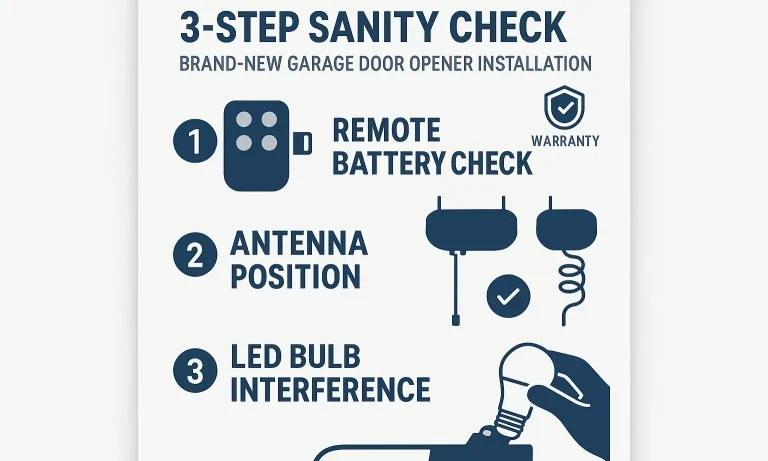
Before you dive into complex diagnostics, let’s cover the three most common mistakes made during a fresh installation. Getting these right solves the problem for the vast majority of people.
Step 1: Check the Remote’s Readiness
It sounds obvious, but it’s a crucial first step. Brand-new remotes often ship with a small plastic tab protecting the battery.
- Pull the Tab: Did you remember to pull the plastic battery tab out? If not, the remote has no power.
- Confirm the Light: Press a button. A solid LED light should appear. If it’s weak, flickering, or non-existent, the battery might be a dud, even if it’s new. A quick swap can make a world of difference. Your garage remote battery is the easiest component to check and replace.
Step 2: Unfurl the Antenna Wire
This is the #1 most common “new install” mistake. The opener unit has a thin wire dangling from it—that’s the antenna. In the box, it’s neatly coiled. For a clean-looking installation, many people are tempted to leave it coiled or tuck it away.
This is a mistake. That wire needs to hang freely, pointing straight down toward the floor, to get the best reception. Make sure it’s not touching any metal rails, brackets, or other wiring. Just let it hang.
Step 3: Test the “Light Bulb Theory”
Here comes the biggest “aha moment” for modern garage owners: your light bulb might be screaming static at your opener.
Many new openers come with an energy-efficient LED bulb. Unfortunately, some LED bulbs produce significant radio frequency (RF) interference that can jam the signal from your remote.
- The Quick Test: With your car at a distance where the remote fails, unscrew the light bulb from the opener unit. Now, try the remote again.
- The Result: If the door suddenly opens, you’ve found your signal killer! You’ll need to find an LED bulb specifically designed for low RF interference (often labeled as “garage door opener compatible”).
If you’ve gone through these three steps and the range is still poor, don’t worry. It’s time to move on to a more detailed diagnostic.
Building: The Full Diagnostic Checklist: Finding the Signal Killer
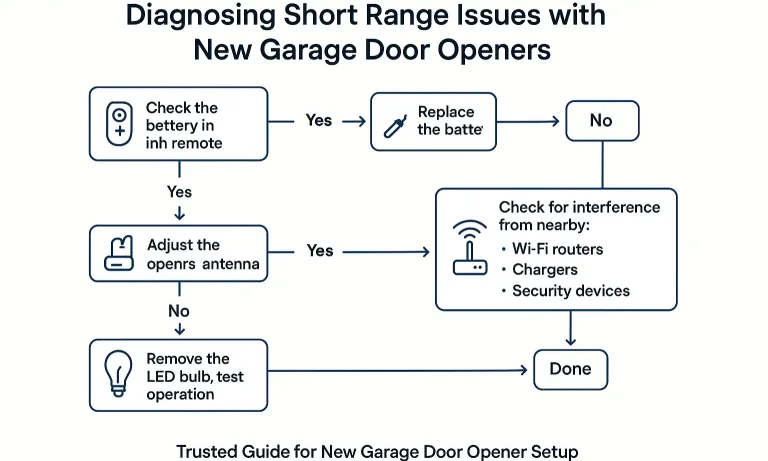
If the sanity check didn’t solve it, the problem is likely another form of interference or a minor programming glitch. This flowchart gives you a visual path to follow, helping you systematically pinpoint the issue.
Here are the key steps to take:
- Reprogram Your Remotes: Sometimes the initial pairing between the remote and the opener is weak. Clearing the opener’s memory and starting fresh can create a stronger connection. If you’re unsure how to reprogram garage door opener units, a step-by-step guide can make the process simple. This often resolves any lingering garage door remote programming issues.
- Scan for Other New Electronics: Did you install anything else in your garage recently? A new Wi-Fi extender, a smart-home hub, a battery charger for your power tools, or even a new refrigerator can emit RF interference. Try unplugging these devices one by one to see if your remote’s range improves.
- Check Brand-Specific Nuances: Some brands have unique features or quirks. If you have a popular model, looking into a brand-specific guide can be helpful. For example, our LiftMaster garage door opener troubleshooting article covers issues common to that line, while our tips for a <a Chamberlain garage door opener remote can help with pairing.
Mastery: Understanding and Defeating Radio Interference
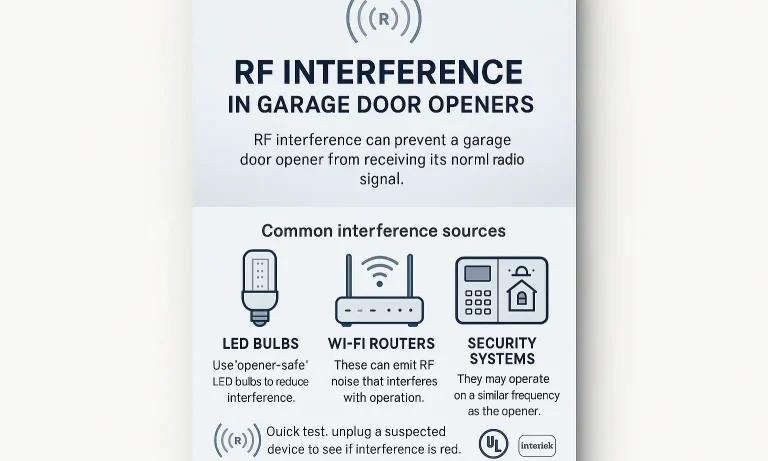
Radio Frequency (RF) interference is the invisible enemy of garage door openers. Your remote sends a low-power radio signal to the opener. Other electronic devices can broadcast “noise” on or near the same frequency, effectively drowning out your remote’s signal until you get very close.
Common sources of RF interference in a modern garage include:
- LED and CFL Bulbs: As we’ve covered, these are the top offenders.
- Wi-Fi Routers & Extenders: Placing a router too close to the opener unit is a common problem.
- Cordless Tool Chargers: Many chargers create significant radio noise when actively charging a battery.
- Security Systems & Cameras: Wireless security devices can sometimes conflict with opener frequencies.
- Smart Power Plugs & Switches: Any device that communicates wirelessly is a potential source of interference.
If you suspect RF noise is your problem, but you can’t eliminate the source, learning how to extend the garage door opener range with an antenna extension kit can be an effective solution.
Action: When to Suspect a Faulty Part
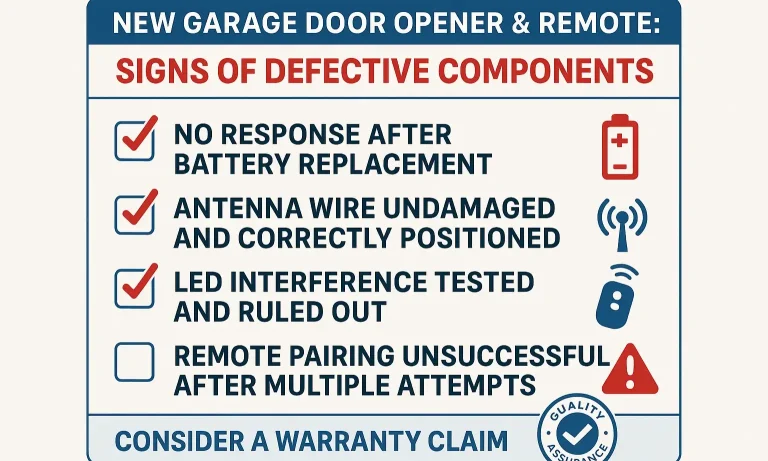
You’ve done it all. You’ve checked the basics, hunted for interference, and reprogrammed everything. If your range is still terrible, it’s time to consider the possibility that a component was defective from the factory. It’s rare, but it happens.
Here’s how to know when to contact the manufacturer for a warranty claim:
- You Have a Second Remote: If one remote works perfectly and the other only works up close, you likely have a single faulty remote. This is the easiest warranty fix.
- The Range is Consistently Poor: If you’ve tested at different times of day (to rule out intermittent interference from a neighbor) and the range is always just a few feet, the issue is constant.
- You’ve Eliminated All Interference: You’ve unplugged everything else in your garage, turned off the lights, and the range is still bad.
- The Wall Control Works Perfectly: The wired wall control panel works from any distance (because it’s wired), confirming the opener motor itself is fine.
If you’ve checked all these boxes, you can be confident that the problem lies with either the remote’s transmitter or the opener’s internal receiver board. At this point, it’s time to stop troubleshooting and use that warranty. And if you ever need a guide on how to fix a garage door opener remote in the future, we have resources for that, too.
Frequently Asked Questions
Why does my remote work from inside the garage but not from the driveway?
This is a classic sign of RF interference or a blocked signal. Your garage door itself, especially if it’s insulated or made of metal, can block the weak signal from your remote. When you’re inside, the signal doesn’t have to pass through the door. This points strongly to a signal strength issue, making the antenna and interference checks extra important.
My old opener worked perfectly. Why is this new one so sensitive?
Modern openers often use different radio frequencies than older models to improve security. Unfortunately, these frequencies can sometimes be more crowded with interference from all the wireless technology we use today (Wi-Fi, Bluetooth, smart devices). Your old opener may have been operating on a clearer “channel.”
I have an older remote with dip switches. Does this advice still apply?
Absolutely. While the programming is different, the fundamentals of signal transmission are the same. A properly positioned antenna, fresh batteries, and an interference-free environment are just as crucial for older models. If you have a garage door dip switch system, these troubleshooting steps are still your best starting point.
Could the cold weather be affecting my new remote’s range?
Yes, it can. Extreme cold can reduce the effectiveness of alkaline batteries, weakening the signal your remote sends out. If your range issues only started when the temperature dropped, try warming the remote in your house or swapping the battery with a lithium one, which performs better in the cold.
Your Path to Perfect Range
Dealing with a weak signal on a brand-new garage door opener is frustrating, but it’s a problem you can solve. By methodically working through these steps—from the simple sanity checks to the more detailed interference hunt—you can identify the culprit and get the reliable, long-range performance you expected from day one. You’ve installed the opener; now you have the knowledge to perfect its performance.
You May Also Like
How to Extend the Garage Door Opener Range: Tips to Boost the Remote Signal
Remote controls are designed to make life easier, especially when it comes to opening your garage door from a distance. If your remote only works when you’re right in front of the door, it might be time for a few…
Published Date: Sep 2, 2025
Why Your Garage Door Remote Range Decreases in Cold Weather
It’s one of the most frustrating moments of winter: you pull up to your home, shivering, and press the garage door remote. Nothing happens. You press it again, holding it closer to the windshield. Still nothing.…
Published Date: Apr 24, 2026
Troubleshooting Dip Switch Garage Door Opener Range
Does your garage door have a mind of its own? One day the remote works from the end of the street, and the next you have to be inches from the door, mashing the button in frustration. Or worse, the door opens and…
Published Date: Apr 21, 2026