





Garage Door Opener Settings Won’t Erase or Reset Properly
Published: Jun 9, 2026
You’ve followed the manual. You’ve held down the “learn” button for what feels like an eternity. You may have even unplugged the unit, hoping for a magical reboot. Yet, here you are. The remote still doesn’t work, the keypad won’t connect, and your garage door opener is stubbornly refusing to forget its old settings.
It’s a frustrating scenario, and a surprisingly common one. Most online guides tell you how to perform a standard reset, but they stop there. They don’t tell you what to do when it simply doesn’t work.
You’re in the right place. This is the guide for when the basics have failed. We’re going to walk through this like a friendly expert, exploring why your opener is being so stubborn and what to do about it, step-by-step.
Foundation: Understanding the 3 Types of Resets (and Which One You Actually Need)
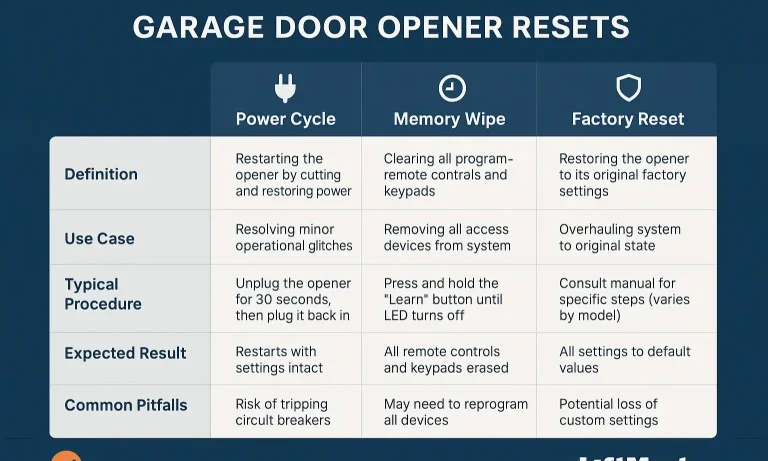
First, let’s clear up a major point of confusion. The word “reset” is used to describe three different actions, and using the right one is key. Think of it like restarting your computer versus wiping its hard drive—both are “resets,” but they solve very different problems.
Power Cycle (The “Soft Reset”): This is simply unplugging the opener from the wall for about 60 seconds and plugging it back in.
When to Use It: When the opener is acting glitchy—the light is flashing randomly, or it’s not responding at all. A power cycle reboots the system’s logic board but does not erase any programmed remotes or keypad codes.
Memory Wipe (The Most Common “Reset”): This is the process of holding down the “Learn” button on the motor unit for about 10 seconds until the indicator LED turns off.
When to Use It: When you need to erase all paired remotes and keypads. This is the solution if you’ve lost a remote, want to ensure old codes are gone, or are facing garage door remote programming issues. This is the step that is likely failing for you right now.
Factory Reset (The “Hard Reset”):This is a more complex procedure that often involves adjusting travel and force limits. It returns the opener to its out-of-the-box state.
When to Use It: Only as a last resort when the opener’s basic functions, like how far it opens or closes, are incorrect. This often requires recalibrating the garage door force adjustment settings.
For this guide, we’ll focus on troubleshooting the Memory Wipe, as it’s the most common and frustrating failure point.
Building: The Interactive Diagnostic Flow
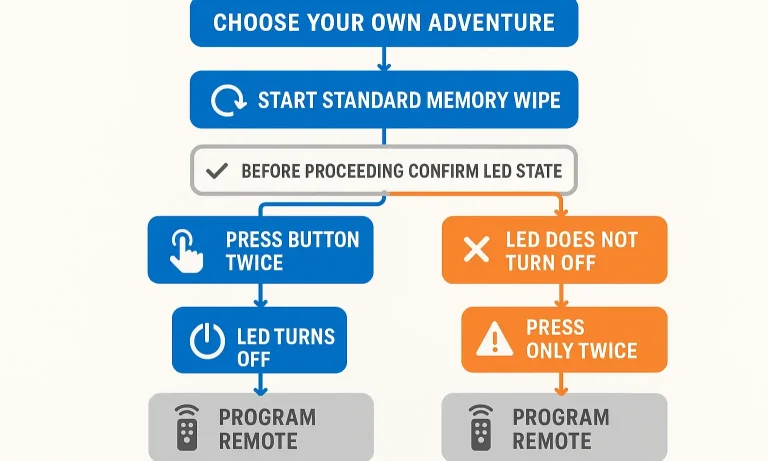
Let’s figure out what’s going on. We’ll start with the standard procedure and branch out based on your opener’s response. This isn’t just a list of instructions; it’s a decision tree to pinpoint the exact problem.
Step 1: Attempt the Standard Memory Wipe
- Locate the “Learn” button on your garage door opener motor. It’s usually a square button, often next to a small LED light.
- Press and hold this button firmly.
- Watch the LED. It should light up and stay lit. Continue holding the button for about 10-15 seconds.
Now, what happened?
Result A: The LED turned off after 10-15 seconds.
Diagnosis: Success! The memory is cleared. Your problem isn’t the reset itself, but the reprogramming that comes after.
Next Step: Jump down to the section titled “Memory Wiped, But Remotes Won’t Re-Pair.”
Result B: The LED did not turn off, or it never lit up at all.
Diagnosis: This is a true reset failure. The opener is ignoring your command.
Next Step: Proceed to the “Advanced Diagnostics” section below. This is where we dig deep.
Mastery: Advanced Diagnostics: When the 'Learn' Button Fails
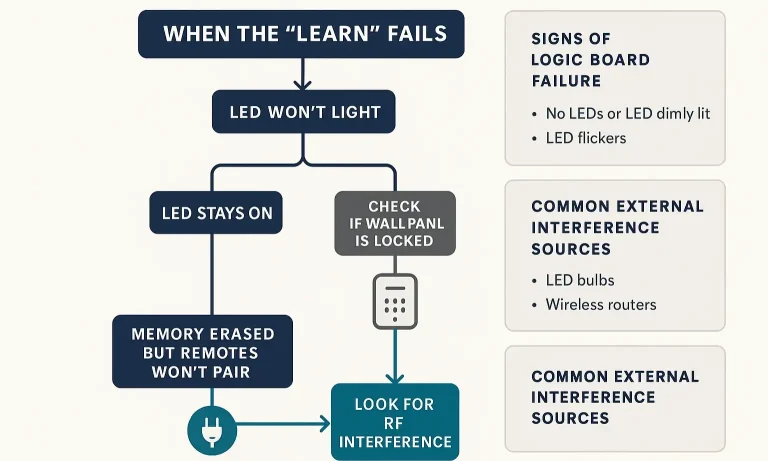
If you’re in this section, it means the standard process isn’t working. Don’t worry—we can still figure this out. The behavior of the “learn” button and its LED is our primary clue. Let’s break down the common symptoms.
Symptom 1: The “Learn” Button LED Doesn’t Light Up at All
You press the button, but nothing happens. The LED remains dark. This points to one of two likely culprits: a power issue or a lock feature.
- Check the Wall Control Panel: Many modern wall-mounted garage door controls have a “Lock” or “Vacation” mode. When activated, this feature disables all remote signals as a security measure, and on some models, it also prevents the learn button from responding. Look for a physical switch or a button with a lock icon. If it’s on, disable it and try the memory wipe again.
- Confirm Power to the Unit: It sounds simple, but it’s a crucial check. Is the opener plugged into a working outlet? Look for the main overhead light on the motor unit to turn on when you block the safety sensors. If there’s no power at all, you may have a tripped breaker or a faulty outlet.
- “Learn” Button is Unresponsive: If power is confirmed and lock mode is off, the button itself or the logic board it’s connected to might be the problem. If the learn button on your garage door opener seems physically stuck or unresponsive, it might require professional attention.
Symptom 2: Memory Wiped, But Remotes Won’t Re-Pair
This is a classic “Aha!” moment for many homeowners. You successfully erased the memory (the LED turned off), but now none of your remotes will pair back with the opener. You press the learn button, press the remote button, and… nothing.
The issue here is almost always Radio Frequency (RF) Interference. The opener can “hear” the button press to erase its memory, but it can’t “hear” the faint signal from your remote over the noise.
⚠️ Common Mistake: Blaming the remote or opener first. The culprit is often a new device you’ve recently added to your garage.
Your RF Interference Checklist:
LED Light Bulbs: This is the #1 cause. Cheap or poorly shielded LED bulbs (even those not in the opener itself) can emit a radio frequency that jams the signal from your remotes.
- The Test: Unscrew all LED bulbs in your garage. Then, try reprogramming your remote. If it works, you’ve found the problem. Replace the offending bulbs with “garage door opener compatible” LEDs.
New Electronics: Have you recently installed a new wireless security camera, smart home hub, or even a baby monitor in or near the garage? These can also create interference.
Battery Terminals: Check the battery in your remote. Sometimes, the contact points can get corroded. A quick clean with a pencil eraser can restore a solid connection.
If you suspect this is the issue, learning more about how to troubleshoot your garage door opener range can provide even more insight.
Symptom 3: The “Learn” Button LED Stays On Indefinitely
You press and hold the learn button, it lights up… and it never turns off, no matter how long you hold it. This is a strong indicator of a more serious internal problem.
Logic Board Failure: The logic board is the “brain” of your garage door opener. When it malfunctions, it can get stuck in a loop, causing the LED to remain lit. A power cycle (unplugging for a full minute) is worth a try, but if the problem persists, the logic board likely needs to be professionally diagnosed and possibly replaced. This is a clear case for a garage door opener troubleshooting expert.
Action: Brand-Specific Quick Reference & Next Steps
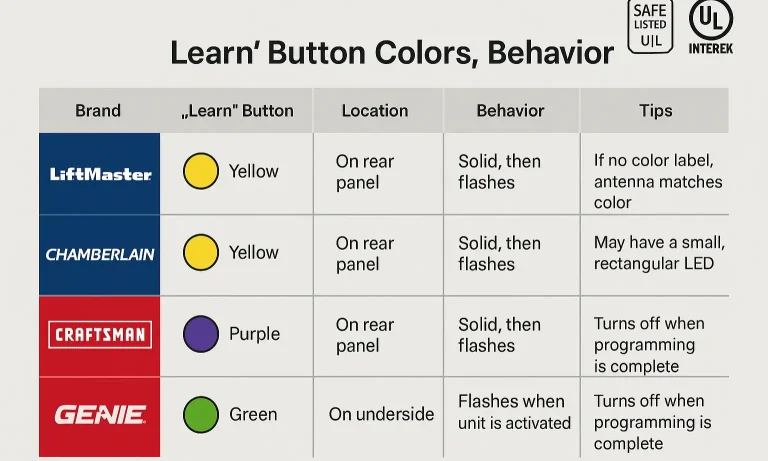
Different brands use different indicators. Knowing what you’re looking for can save you a lot of time and frustration.
LiftMaster / Chamberlain / Craftsman: These are the most common. Look for a square button.
- Purple: Security+ technology (manufactured ~2005-2014).
- Red / Orange: Security+ technology (manufactured ~1997-2005).
- Green: Billion Code technology (manufactured ~1993-1997).
- Yellow: Security+ 2.0 technology (newest models). These often have a “MyQ” logo.
Genie / Overhead Door: Often a black or gray button labeled “Learn Code.” The process is very similar.
When It’s Time to Call a Professional
You’ve done your due diligence. You’ve power-cycled, checked for lock mode, hunted for RF interference, and the opener still won’t cooperate. Sometimes, the most efficient and stress-free solution is to call in an expert.
Contact a professional if:
- You suspect a faulty logic board.
- The learn button is physically damaged or unresponsive.
- You’ve gone through all the advanced diagnostics and nothing has worked.
- You’re simply not comfortable working with the electrical components of your opener.
A trained technician can quickly diagnose the root cause, whether it’s a failed component or a complex interference issue, and get your garage door working safely and reliably again.
Frequently Asked Questions (FAQ)
Will unplugging a garage door opener reset it?
No. Unplugging it (a power cycle) will only reboot the system. It will not erase any programmed remotes, keypads, or travel limits. You must use the “Learn” button to perform a memory wipe.
What’s the difference between resetting and reprogramming?
Resetting (the memory wipe) is the act of erasing all devices from the opener’s memory. Reprogramming is the act of adding a device (like a remote or keypad) back into the opener’s memory after it has been reset. You must always reprogram your devices after a successful memory wipe. If you need help, here’s a guide on how to program a garage door remote.
My opener reset fine, but now my keypad won’t work. What do I do?
A memory wipe erases everything. You will need to reprogram your garage door keypad using the same process you used for your remotes.
How do I know if my remote’s battery is the problem?
Most garage door remotes have a small LED that lights up when you press a button. If that light is dim, flickering, or doesn’t come on at all, start by replacing the battery before attempting any resets on the opener itself.
I pulled the red emergency cord and now the opener won’t work. Is that related to the reset?
This is a different issue. The red cord disengages the door from the opener for manual operation. You’ll need to re-engage it. We have a guide that explains exactly how to reset a garage door opener after pulling the red cord.
You May Also Like
When to Perform a Full Garage Door Opener Memory Erase
You wouldn't hand out keys to your front door and forget who has one. Yet, many of us do exactly that with the largest door to our home: the garage. Over the years, countless digital "keys"—remotes, keypad codes, and…
Published Date: Jun 8, 2026
How to Erase Garage Door Opener Settings: Fast Tips for a Fresh Start
Whether you’re moving, upgrading your system, or tightening up security, there may come a time when you need to erase garage door opener settings. Clearing out old remotes or keypads is a smart way to make sure no…
Published Date: Aug 7, 2025
Resetting Garage Door Opener Travel Limits
You pulled the red emergency release cord—maybe the power was out, or you needed to open the door manually. You got it done, re-engaged the trolley, and breathed a sigh of relief. But now, something’s wrong. The door…
Published Date: Jun 5, 2026