





Troubleshooting HomeLink & Car2U Programming Failures Without a Remote
Published: Mar 26, 2026
It should be simple, right? Press a button on your garage door opener, hold a button in your car, and voilà—the two are paired. But if you’re reading this, you probably know it’s rarely that easy, especially when you don’t have the original remote.
You’ve followed the manual, watched a few videos, and now you’re stuck in a loop of blinking lights that don’t actually open the door. It’s a common frustration, and most guides don’t cover the real-world glitches that stop you in your tracks.
This isn’t just another set of instructions. This is a diagnostic guide. We’re going to walk through why these systems fail and provide the troubleshooting steps that are usually buried in the comments section of enthusiast forums. Think of this as the conversation you’d have with a knowledgeable friend who’s seen—and solved—this problem a dozen times.
Foundation: The 2-Minute Pre-Flight Checklist Before You Program
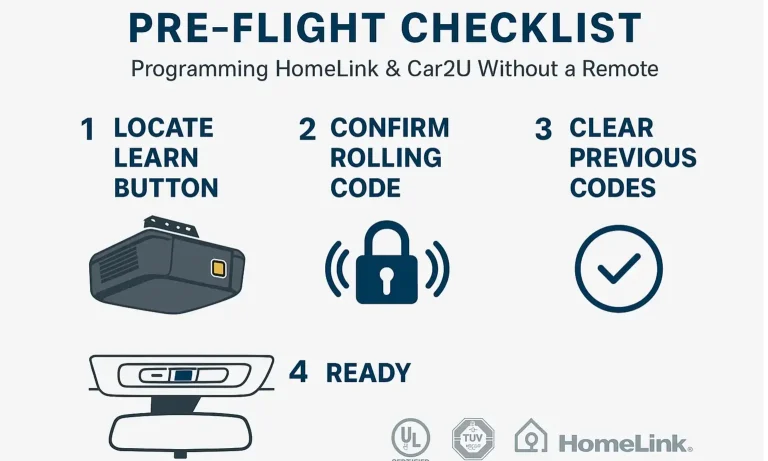
Before you press a single button, taking a moment to prepare can save you half an hour of frustration. Most programming failures happen because of a missed step at the very beginning.
- Clear the Slate: Your car’s HomeLink or Car2U system might have old codes stored from a previous owner or failed attempts. Wiping these is the essential first step. If you’re unsure how to clear garage door opener codes from your car, it usually involves holding the two outer buttons in your car for about 20 seconds until the indicator light changes.
- Find Your “Learn” Button: This is the most important button in the whole process. Go to the motor unit of your garage door opener (the box hanging from the ceiling) and locate the “Learn” button. It’s usually a small, square button next to an LED light. Note its color (purple, red, orange, green, or yellow), as this can be important for troubleshooting later.
- Position Your Vehicle: Don’t try to program from inside a closed garage. The signal can be unpredictable. Park your car just outside the garage, with the nose pointed toward the door. This ensures the strongest, clearest signal path between your car and the opener unit.
- Grab a Partner (or a Ladder): The process requires you to press the “Learn” button on the opener and then get back to your car within about 30 seconds. Having a second person makes this much smoother and safer than scrambling up and down a ladder.
Building: The Two Paths to Success: Choose Your Method
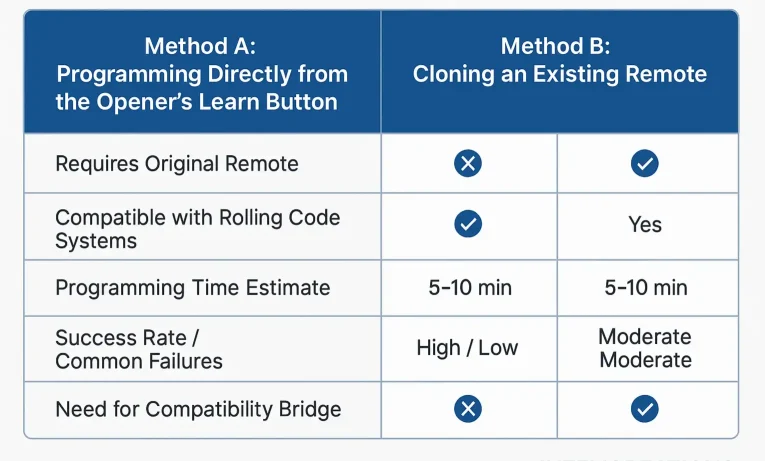
The single biggest point of confusion is understanding that there are two fundamentally different ways to program a remote system. When you don’t have a remote to clone, you are left with only one path.
- Method A: Cloning an Existing Remote: This is what most people think of first. You hold a working remote near your car’s button and the car “learns” its signal. This is great if you have a remote, but useless if you don’t. We have a separate guide if you need to program a garage door remote from another remote.
- Method B: Pairing Directly to the Opener (“Learn” Button Sync): This is the method you need. You’re not cloning anything; you’re creating a brand new, secure connection directly between your car and the opener’s main unit. This is necessary for virtually all modern openers that use “rolling code” technology—a security feature where the code changes every time you use it.
Your Step-by-Step Guide for the “Learn Button” Method
Since you don’t have a remote, this is your path forward. Follow these steps precisely.
- Prepare the Car: Get in your car (which is parked outside). Press and hold the HomeLink button you want to program. Keep holding it.
- Activate Learning Mode: While still holding the button in your car, have your helper press and immediately release the “Learn” button on the garage door opener motor. CRITICAL WARNING: Do NOT hold the “Learn” button down. Holding it for more than a few seconds will erase the memory of all your remotes, creating a much bigger problem. Just one quick press is all you need.
- Complete the Sync: The LED next to the “Learn” button should start blinking. You now have about 30 seconds. In your car, continue holding the HomeLink button. Watch the indicator light in your car. It should go from a slow blink to a rapid blink, and then may turn solid.
- Test the Connection: Release the button in your car. Now, press it again. If the programming was successful, your garage door should move. You may need to press it a second time to confirm.
If you’re having trouble with this process, our guide on how to program a garage door to a car without a remote offers additional details and model-specific tips.
Mastery: The Ultimate Troubleshooting FAQ: What to Do When It Fails
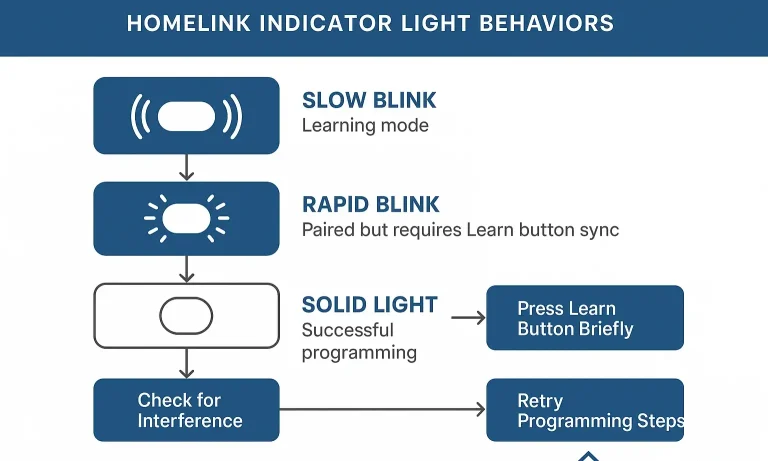
This is where most guides end and frustration begins. If the steps above didn’t work, don’t worry. Your situation is common. Let’s diagnose the problem based on what your car’s light is doing.
My car’s light is blinking rapidly, but the door won’t move.
This is actually a good sign! It’s the most common “failure” and means you are 90% of the way there.
- What it means: Your car has successfully learned the opener’s signal type, but it hasn’t completed the final “handshake” with the rolling code security system.
- The Fix: You just need to complete the “Learn Button” sync. Press and release the “Learn” button on the opener motor one more time. Then, get back in your car and press the programmed HomeLink button two or three times. This should finalize the connection and your door will operate.
The light in my car never stops its slow blink.
This indicates a failure to pair. The car is trying to listen for a signal, but it’s not hearing anything it recognizes.
What it means: There’s a communication breakdown. This is often due to signal interference or a compatibility issue.
The Fixes:
- Check for Interference: Believe it or not, certain LED light bulbs in your garage or opener can emit radio frequencies that jam the signal. Try unplugging them and running through the process again.
- Check Compatibility: If your garage door opener was made before 1995, it likely uses a fixed code and might not be compatible with modern in-car systems. Similarly, some brand-new openers use security protocols (like Security+ 2.0) that aren’t compatible with systems in cars that are a few years old.
- What it means: The two devices are speaking different “languages.” Your car’s HomeLink system may not be equipped to handle the advanced rolling code signals of a modern opener.
- The Fix: You likely need a HomeLink Compatibility Bridge (or Repeater Kit). This small device plugs into an outlet near your opener. It acts as a translator, converting the signal from your car into one the opener can understand. You can check your smart garage door opener compatibility to see if a bridge is required for your models.
What if my opener is older and still won’t connect?
If you have an older car and a newer opener (or vice-versa), you may be facing a technology gap.
Common Questions About HomeLink & Car2U Programming
What’s the difference between HomeLink and Car2U?
They are competing in-car remote systems. HomeLink is the most common, found in a wide variety of vehicle brands. Car2U is typically found in vehicles from brands like Lear. The programming steps are very similar, but always consult your car’s owner manual for specific button-press sequences.
Why do I need the “Learn” button for rolling code systems?
Think of a rolling code as a password that changes every time you use it. When you press the “Learn” button, you’re telling the opener, “The next valid code I receive is from a new device I want to authorize.” This allows your car to sync up with the constantly changing sequence, ensuring no one can capture your signal and replay it to open your garage.
I held the “Learn” button too long. Now what?
If you held the “Learn” button for more than 6-8 seconds, you likely wiped the opener’s entire memory. This means none of your old remotes or keypads will work. Don’t panic. You’ll simply need to re-program each device one by one, including your car, using the “Learn” button method. For specific models, like a Linear, our guide to Linear garage door opener remote programming can help.
Action: Your Next Steps When All Else Fails
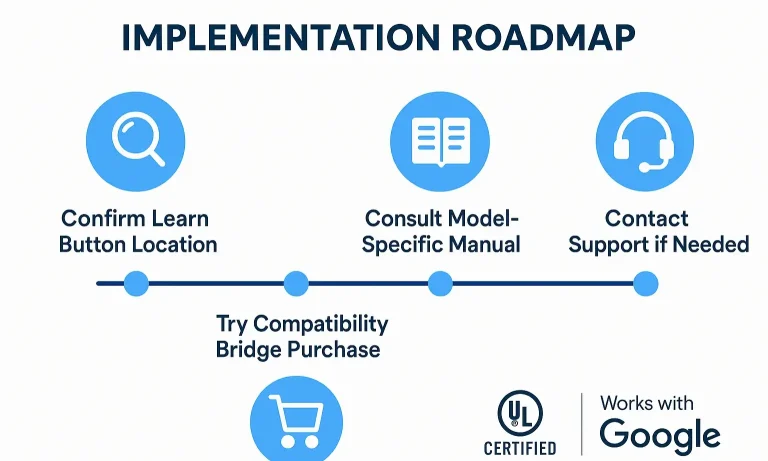
If you’ve gone through the checklist and all the troubleshooting steps and are still stuck, the issue may be more complex. It could be one of the less common garage door problems related to the opener’s logic board or antenna.
Here’s what to do:
- Confirm Compatibility: Double-check online to see if your specific car model year and garage door opener model require a compatibility bridge. This is the most common unresolved issue.
- Consult Your Manuals: Look up the owner’s manual for both your vehicle and your garage door opener. They may have specific instructions or warnings not covered in general guides.
- Consider Professional Help: Sometimes, an expert eye can spot the problem in minutes. A faulty logic board, a damaged antenna wire, or severe RF interference can mimic a programming failure. A professional technician can diagnose these issues quickly and safely.
Programming your car to your garage should be a convenience, not a headache. By understanding the process and knowing how to diagnose the common failure points, you can solve the problem and enjoy the simple pleasure of opening your garage with the touch of a button.
You May Also Like
Why Can’t I Program My New Garage Remote From My Old One
You remember the old days, right? You'd get a new garage remote, hold it next to the old one, press a few buttons, and—presto! A perfect copy. It was simple and it worked. But you just tried that with your new…
Published Date: Mar 25, 2026
How To Open a Garage Door Without a Remote: Step-by-Step in an Emergency
If you’ve ever been stuck outside your garage during a power outage or lost your remote at the worst possible time, you’re not alone. Knowing how to open a garage door without a remote is a handy skill for any…
Published Date: Oct 24, 2025
How to Program a Garage Door to a Car Without a Remote: Easy-to-Follow Guide
You don’t always need a handheld remote to operate your garage door from your car. Many vehicles now come with built-in controls that let you sync directly to the opener. This guide will walk you through how to…
Published Date: Jul 11, 2025