





Safety Protocols for Malfunctioning Garage Door Opener Photo-Eye Sensors
Published: Jun 3, 2026
You’re heading out, you press the button, and… nothing. The garage door starts to close, then suddenly reverses. You look at the opener, and a light is blinking insistently. It’s a frustrating moment we’ve all faced, but that blinking light isn’t a sign of failure—it’s a diagnostic code. Your garage door’s safety system is trying to tell you exactly what’s wrong.
More often than not, the culprit is the pair of small “photo-eye” sensors located a few inches off the floor on either side of your garage door opening. These sensors are the most critical safety feature of your entire system. Understanding how they work and what to do when they malfunction is essential for keeping your home and family safe.
This guide will turn that frustration into a quick fix. We’ll decode the messages your sensors are sending and walk you through the immediate steps to restore safety and function to your garage door.
The Foundation: How the Safety Sensor 'Sees' and Why It Fails
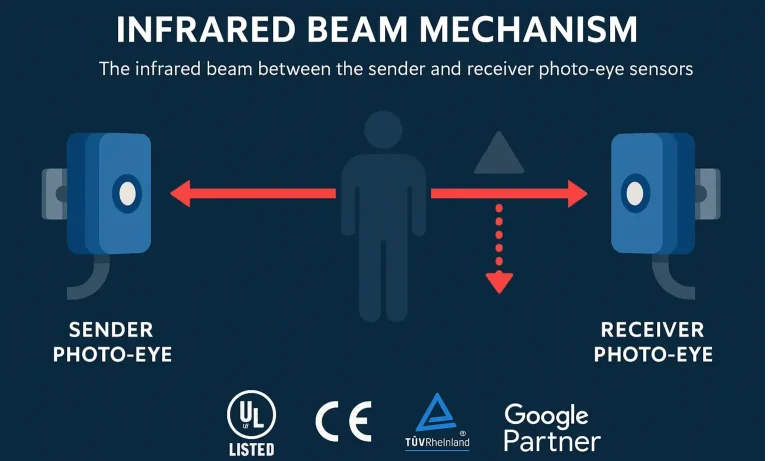
Think of your photo-eye sensors as an invisible tripwire. One sensor, the “sender,” shoots a continuous, focused beam of infrared light to the other sensor, the “receiver.” As long as the receiver can “see” this beam, it tells the garage door opener, “All clear! It’s safe to close.”
The moment anything—a child, a pet, your car, or even a stray leaf—breaks that beam, the receiver instantly alerts the opener. The system’s primary safety protocol kicks in, and the door automatically reverses to prevent a potential accident.
This simple, brilliant system can fail for a few common reasons:
- Obstruction: Something is physically blocking the beam’s path.
- Misalignment:The sensors have been bumped and are no longer pointing directly at each other.
- Dirty Lenses: Dust, cobwebs, or grime on the sensor lenses are scattering the beam.
- Wiring Issues: A wire has been frayed, chewed, or disconnected.
- Sunlight Interference: Direct, bright sunlight is blinding the receiver sensor.
That blinking light on your motor unit is your starting point. It’s not just a generic error; it’s a specific clue pointing to one of these issues.
The 5-Step Diagnostic Flowchart: Find Your Fix in Minutes
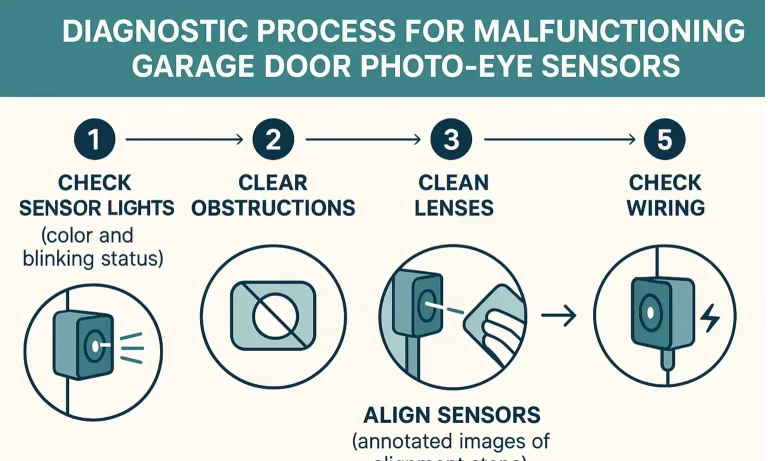
Instead of guessing, let’s troubleshoot like a professional. Follow this logical flow to quickly identify and solve the problem. This process will handle over 90% of photo-eye sensor issues safely and efficiently.
Step 1: Check the Sensor Lights
Before you do anything else, look at the small LED lights on the sensors themselves. Typically, both lights should be solid.
- The sending sensor usually has a solid amber or orange light, indicating it has power.
- The receiving sensor usually has a solid green light, indicating it has power and is receiving the beam.
If one or both lights are off or blinking, you have your first major clue. Understanding what garage door sensor colors mean is key. For example, if you see an orange light on a garage door sensor, it often points to a misalignment problem. Knowing how to fix the garage door sensor can be your fastest path to a solution.
Step 2: Clear Any Obstructions
This may seem obvious, but it’s the most common culprit. Check the direct line between the two sensors. Remove any objects like trash cans, bikes, tools, or even overgrown weeds that might be breaking the beam. Sometimes the obstruction is less obvious, like a cobweb directly over a sensor lens.
Step 3: Clean the Lenses
Garage environments are dusty. Over time, a fine layer of dirt, dust, or pollen can build up on the “eye” of each sensor, obstructing the infrared beam.
Action: Gently wipe each lens with a soft, clean cloth. Avoid using harsh chemicals or abrasive materials that could scratch the plastic. For a more detailed walkthrough, see our guide on how to clean garage door sensors.
Did this solve the problem? If not, proceed to the next step.
Step 4: Align the Sensors
If the sensors get bumped by a lawnmower or a stray basketball, they can easily get knocked out of alignment.
- Action: Gently adjust one of the sensors by hand, moving it slightly up, down, left, or right until the LED light on the receiving sensor turns solid green. Most sensors are attached to the bracket with a wingnut that you can loosen for adjustment and tighten once aligned. Pay close attention to the light; it will tell you when you’ve hit the sweet spot.
- Pro-Tip: Don’t just tighten the wingnut; make sure the LED is solid before you tighten it down. For a complete guide, learning how to align garage door sensors is an invaluable skill for any homeowner.
- Action: First, perform a quick visual inspection. Look at the wires running from each sensor back to the motor unit. Check for any obvious signs of damage—frayed insulation, cuts, or staples that might have pierced the wire. Sometimes, a wire simply pops out of its terminal on the back of the motor. Make sure each connection is secure.
- Safety First: If you suspect damaged wiring, it’s best to disconnect the power to the garage door opener at the circuit breaker before touching anything. Understanding the garage door safety sensor wiring diagram can be helpful, but if you’re uncomfortable, this is a clear sign to call a professional.
Step 5: Check the Wiring
If the lights are off on both sensors, it could be a power issue. This step requires a bit more care.
Advanced Troubleshooting & Pro Tips
If the basic steps didn’t resolve the issue, don’t worry. Here are some less common problems and their solutions.
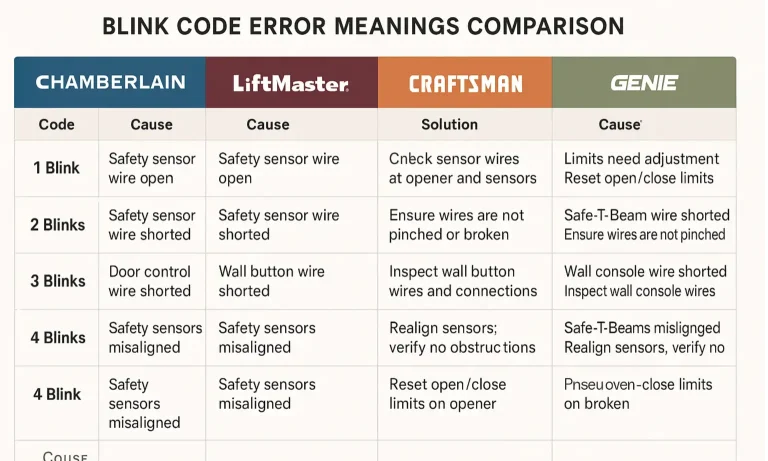
The Master Blink-Code Guide
That blinking light on your main opener unit is a code. Unfortunately, these codes aren’t universal. A Chamberlain opener might blink 10 times for one problem, while a Genie blinks twice for the same issue. Here is a quick breakdown to help you correlate error signals with troubleshooting steps across major garage door opener brands:
- LiftMaster / Chamberlain: 1 or 2 blinks typically indicate misaligned or obstructed safety sensors.
- Genie: A blinking green light means the safety sensors are not aligned or are blocked.
- Craftsman: 1 to 6 flashes often indicate a sensor issue—check for alignment or obstructions.
- Ryobi: A slow blinking blue light indicates that the safety sensors are misaligned or obstructed.
The Sunlight Problem
Does your garage door only refuse to close in the late afternoon? Direct sunlight could be the culprit. If bright sun shines directly into the “eye” of the receiving sensor, it can overwhelm it, preventing it from detecting the sender’s infrared beam.
- Solution 1: Swap the sender and receiver sensors. Putting the receiver on the shadier side of the door often solves the problem instantly.
- Solution 2: Use a sun shield. You can create a simple shield from a cardboard tube (like from a paper towel roll) and place it around the receiving sensor to block the ambient sunlight.
- The LED light on a sensor will not illuminate even with confirmed power and clean wiring.
- There is visible physical damage to the sensor casing, such as cracks.
- You’ve perfectly aligned the sensors, and the receiver light flickers randomly.
When Is It Time for a Replacement?
If you’ve tried all the steps above and a sensor light still won’t turn on, the sensor itself may have failed. Consider a garage door sensor repair or replacement if:
Your Post-Fix Safety Checklist
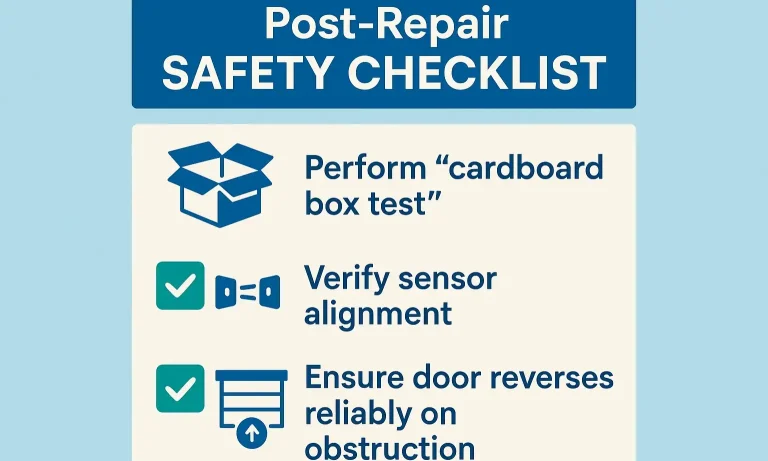
Once you believe you’ve fixed the issue, don’t just walk away. You must verify that the safety system is working correctly.
- Press the Close Button: Let the garage door begin to close.
- The Wave Test: While the door is descending, wave a broom handle or your foot (carefully!) through the path of the sensors.
- Confirm Reversal: The door should immediately stop and reverse to the fully open position.
- The Box Test: For a more definitive test, place an empty cardboard box on the ground in the door’s path. When the door touches the box, it should also reverse. This tests the separate pressure-reversal system.
If the door passes these tests, you have successfully restored its most important safety features.
Frequently Asked Questions
What do garage door safety sensors do?
They create an invisible infrared beam across the garage door opening. If this beam is broken while the door is closing, it signals the opener to immediately reverse direction, preventing it from closing on a person, pet, or object.
Can a garage door work without the sensors?
While it’s technically possible to bypass the sensors, it is extremely dangerous and illegal for professional installers to do so. Federal law has required safety sensors on all new garage door openers since 1993. Operating a door without them turns a modern convenience into a significant safety hazard. If you’re wondering how to bypass safety sensors on a garage door, it’s critical to understand the risks involved.
Why is one garage door sensor green and the other yellow/amber?
This is the standard for most modern systems. The amber/yellow/orange light is typically on the “sending” unit, indicating it has power and is sending the beam. The green light is on the “receiving” unit, indicating it has power and is successfully receiving the beam.
Do I need to call a professional for sensor issues?
For common issues like cleaning, clearing obstructions, and simple realignment, most homeowners can perform the fix themselves. However, if the issue involves faulty wiring, if you cannot get the sensors aligned, or if a sensor needs to be replaced, it’s always safest to call a qualified technician. They have the tools and experience to diagnose and fix the problem quickly and safely, ensuring your door operates correctly. For those curious about a full reset of their garage door sensors, sometimes professional guidance is best.
What does it mean if no lights are on either sensor?
This almost always points to a power issue. Start by checking the wire connections at the back of the motor unit and along the path to the sensors. Look for a disconnected, loose, or damaged garage door sensor wire. If the wiring looks intact, the problem could be with the opener’s logic board, which requires professional service.
By understanding these simple checks, you can confidently handle the most common garage door safety sensor issues yourself, saving time, money, and frustration.
You May Also Like
Safety Protocols When Your Garage Door Traps You
It’s a frustrating moment we all dread. You press the button on your garage door remote, hear a noise… but nothing happens. Or worse, you hear a loud bang, and now the door is completely unresponsive. Whether you’re…
Published Date: Jun 2, 2026
Child and Pet Safety Protocols During a Garage Door Malfunction
That sudden, sickening BANG from the garage stops everyone in their tracks. It’s a sound you can’t ignore. Whether the door is now hanging crooked, stuck halfway, or won’t move at all, your first thought isn’t about…
Published Date: Jun 1, 2026
What To Do After Hitting Your Garage Door: A 5-Minute Safety Checklist
The crunch of metal is a sound no homeowner wants to hear. Whether it was a moment of distraction backing out of the garage or a sudden, jarring failure of the system, a damaged garage door can turn a normal day into…
Published Date: May 28, 2026