





Changing the Code on Older Genie Intellicode Keypads
Published: May 7, 2026
You’re standing outside, juggling groceries, and the familiar convenience of your garage door keypad suddenly feels like a betrayal. You punch in the code, and… nothing. You try again. Still nothing. After a quick search online, you’re stuck watching a dozen different videos that all seem to be for newer models, leaving you more confused than when you started.
If this sounds familiar, you’re not alone. Programming older Genie Intellicode keypads (typically those from before 2010) is a common headache for homeowners. The instructions aren’t always straightforward, and the process can differ significantly from modern systems. But here’s the good news: it’s a problem you can solve.
This guide is designed to be the clear, frustration-free resource that other tutorials aren’t. We’ll walk through the specific quirks of these legacy systems, help you identify exactly what you’re working with, and provide the right steps to get your keypad working again.
First, What Genie Keypad Do You Have?
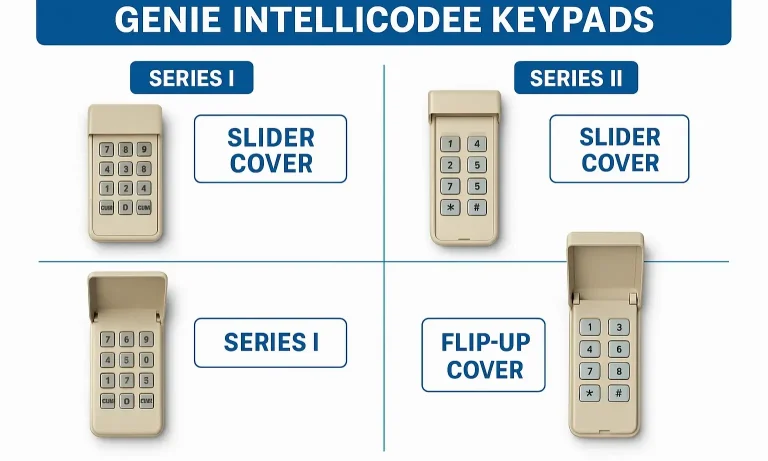
Before you press a single button, the most important step is identifying your keypad model. Why? Because the programming steps are completely different depending on the model series. Many online guides skip this part, which is the primary reason users get stuck.
Most pre-2010 Genie Intellicode keypads fall into two main categories: Series I (often with a slide-up cover) and Series II (with a flip-up cover). They might look similar, but their internal programming logic is distinct.
Take a moment to match your keypad to the images above. Once you have a clear idea of your model, you can confidently proceed with the correct set of instructions.
The Right Steps for YOUR Model (Pre-2010 Intellicode Keypads)
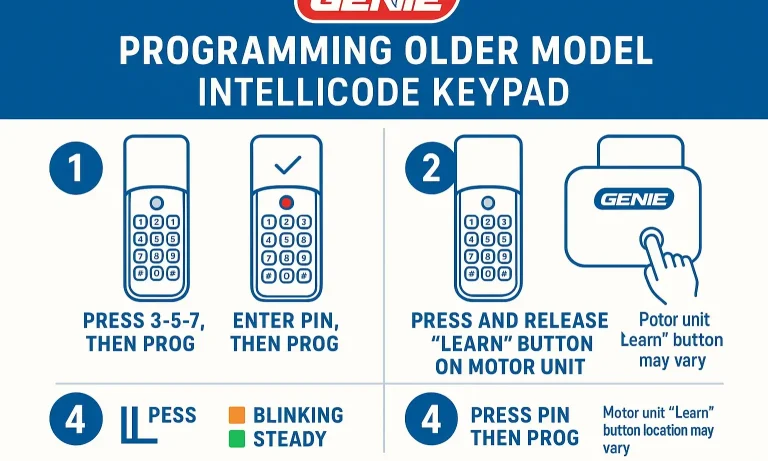
Now that you’ve identified your keypad, let’s get it programmed. We’ll cover the most common method, which involves using the “Learn Code” button on your garage door opener’s motor unit, located on the back or under a light cover.
Programming Your Keypad Using the “Learn Code” Button
This is the standard procedure for the majority of older Intellicode models.
- Locate the “Learn Code” Button: Find this small, often square button on the motor unit of your garage door opener in the garage. It’s usually near an indicator light.
- Press and Release the Button: Press the “Learn Code” button firmly for one second and then release it. The indicator light next to it should start blinking.
⚠️ Common Mistake: Do not hold the button down for more than a couple of seconds. Holding it for too long (e.g., 30 seconds) can erase the memory of all your remotes and keypads, creating a much bigger problem. A single, quick press is all you need.
3. Enter Your Code on the Keypad: Go to your wireless keypad and enter your desired 3-8 digit PIN.
4. Press the Up/Down Button: Immediately after entering your PIN, press the Up/Down (or Arrow) button on the keypad once. The indicator light on the motor unit should turn solid.
5. Confirm the Programming: Press the Up/Down button on the keypad one more time. The indicator light on the motor should turn off, and your garage door should begin to move.
Your keypad is now programmed! If you’re a visual learner or have a different brand, you might find our general guide on how to program garage door keypad helpful for broader context.
The Ultimate Troubleshooting Guide: What to Do When It Doesn't Work
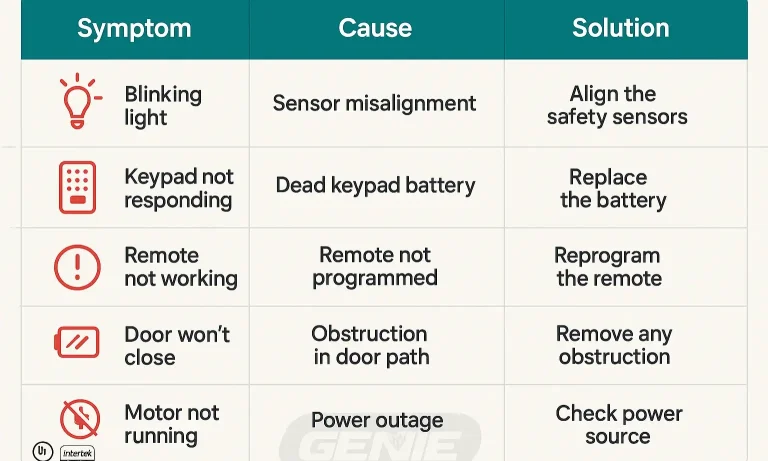
Sometimes, even when you follow the steps perfectly, things don’t go as planned. This is where most online guides fail you. Here are solutions to the most common issues with older Genie keypads.
Symptom: The light on the motor unit blinks, but the keypad code doesn’t work.
- Likely Cause: The opener’s memory is full, or there’s radio frequency interference. Older models could only store a limited number of remotes.
- Solution: Clear the opener’s memory. Press and hold the “Learn Code” button for about 10 seconds until the indicator light goes out. This will erase all programmed remotes and keypads. You will then need to reprogram each device one by one, starting with the keypad.
Symptom: The keypad lights up, but the motor unit doesn’t respond at all (no blinking light).
- Likely Cause: The battery is weak, or the keypad is out of range. Even if the keypad lights up, the battery may not have enough power to send a strong signal.
- Solution: Replace the battery with a fresh, high-quality one. Make sure you are within direct line of sight of the garage door opener when programming. If problems persist, a full reset might be necessary. For more details on this process, see our guide on how to reset a garage door keypad.
- Likely Cause: The keypad lost its programming when the power was cut. This is common in older electronics.
- Solution: You simply need to reprogram the keypad using the steps outlined above. Losing the code during a battery change is a telltale sign of an older model.
Symptom: The keypad stopped working right after I changed the battery.
If you find yourself facing more complex issues, our comprehensive garage door troubleshooting guide can provide further assistance.
Proactive Care: Keep Your System Working for Years
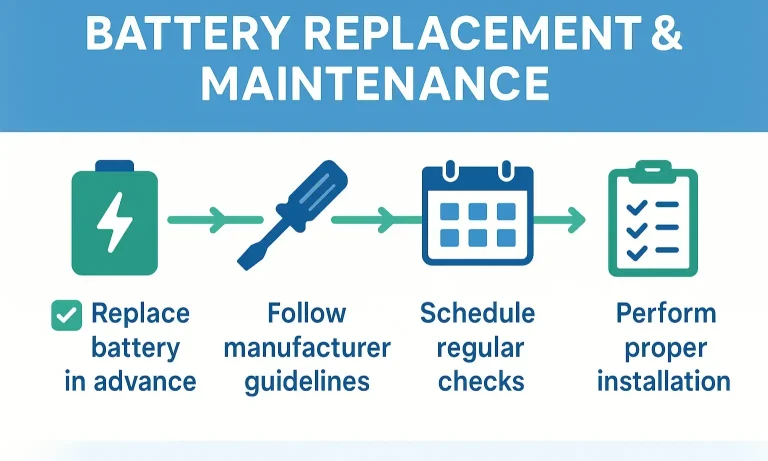
A little maintenance can go a long way in preventing future keypad headaches. With older systems, being proactive is key to reliable performance.
Battery Best Practices
- Change Annually: Don’t wait for the battery to die. Replace it once a year as part of your home maintenance routine (e.g., when you change smoke detector batteries).
- Use Quality Batteries: Cheaper batteries can leak or provide inconsistent power, causing programming and performance issues. Stick with reputable brands.
- Know the Process: If you’re unsure about the specifics, learning how to change battery in garage door opener keypad correctly can prevent accidental damage or code loss.
- Gently wipe down the keypad with a damp cloth to remove dirt and grime that can cause buttons to stick.
- Check for cracks in the cover that could let moisture in, as water damage is a common cause of failure for outdoor electronics.
Clean and Inspect
Frequently Asked Questions (FAQ) for Older Genie Keypads
How do I perform a factory reset on an old Genie keypad?
Most older models don’t have a traditional “factory reset” button on the keypad itself. The reset is performed at the opener motor. By pressing and holding the “Learn Code” button until the light goes out, you effectively wipe the opener’s memory, which forces the keypad back to a default state and requires reprogramming.
Can I use a new universal keypad with my old Genie opener?
Yes, in most cases! Modern universal keypads are designed to be backward-compatible with older technologies, including Genie Intellicode. This can be a great upgrade if your original keypad is failing. If you’re considering this option, our instructions on how to install a garage door keypad can guide you through the setup.
What exactly does the “Learn” button on my garage door opener motor do?
The “Learn” button puts the opener’s logic board into a programming mode for a short period (usually 30 seconds). During this time, it’s “listening” for a signal from a new remote or keypad. When it receives the signal, it saves that device’s unique code to its memory.
When DIY Isn't the Answer
You’ve followed the steps, tried the troubleshooting, and your keypad is still refusing to cooperate. It’s frustrating, but it happens. Sometimes the issue isn’t the programming but a failing logic board in the opener, a worn-out keypad, or subtle radio frequency interference that’s difficult to diagnose.
If you’re at the end of your rope, don’t hesitate to call in a professional. At Up & Down Garage Doors, we’ve seen it all. Our experienced technicians can quickly identify the root cause and provide a clear, fair solution. As a family-owned business, we believe in honest work and helping our neighbors get things running smoothly again. If you need a hand, we’re here to help, 24/7.
You May Also Like
Best Practices for Garage Door Keypad Security
Your garage door keypad is a marvel of convenience. It lets you jog without keys, gives the kids access after school, and lets a trusted neighbor in when you’re away. But have you ever stopped to think about the code…
Published Date: May 5, 2026
How To Change Garage Door Code
Changing your garage door code might not seem to be a priority. However, even the smallest details matter when it comes to keeping your home safe and secure. That’s why taking care of your garage door's functionality…
Published Date: Aug 22, 2024
Setting Up Temporary Garage Door Access Codes for Deliveries or Guests
Ever found yourself in a tricky situation, needing to give someone access to your garage? Maybe the dog walker is coming while you're at work, a contractor needs to drop off materials, or you have a much-anticipated…
Published Date: May 4, 2026