





Chamberlain Battery Backup: Your Guide to a Quiet, Reliable Garage Door
Published: Jul 15, 2026
You’re not alone in your frustration. Many homeowners are surprised to find their main-powered garage door opener suddenly stops working, all because of a small backup battery. This guide is here to decode the mystery. We’ll explain why your opener is beeping, what it means for your home’s security, and how you can fix it for good. Consider this your complete roadmap to understanding the unsung hero of your garage: the Chamberlain battery backup.
Why Your Garage Door Has a Backup Plan (And Why You Need It)
For years, a battery backup was seen as a luxury. Today, it’s an essential safety feature. In states like California, the SB-969 law made battery backups mandatory for all new garage door openers, a direct response to wildfires where residents were trapped because power outages left them unable to open their garages.
But this isn’t just a concern for wildfire-prone areas. Think about it:
- Severe Weather: Thunderstorms, ice, and high winds are common causes of power outages nationwide. A battery backup ensures you’re never locked in or out.
- Remote Locations: If you live in a rural area, power restoration can take longer. A reliable backup is crucial for daily access and emergency situations.
- Peace of Mind: Knowing you have a fail-safe means you can always get your vehicle out or secure your home, no matter what’s happening on the power grid.
Essentially, a modern battery backup garage door opener isn’t just a convenience—it’s a vital part of your home’s safety and accessibility plan.
The Right Battery for Your Chamberlain Opener
Before we dive into troubleshooting, it’s important to know that not all garage door openers are created equal. Battery backup systems are specifically designed for openers that use a DC (Direct Current) motor. These motors are not only quieter and smoother than their AC counterparts, but they’re also energy-efficient enough to run on battery power.
If you have a Chamberlain opener with a battery backup, it likely uses a specific 12-volt rechargeable battery, most commonly the model 4228. This battery is designed to deliver the right amount of power and fit perfectly within the opener’s housing.
Identifying your model is the first step toward ensuring you have the right components for uninterrupted access.
Your Step-by-Step Battery Replacement & Testing Guide
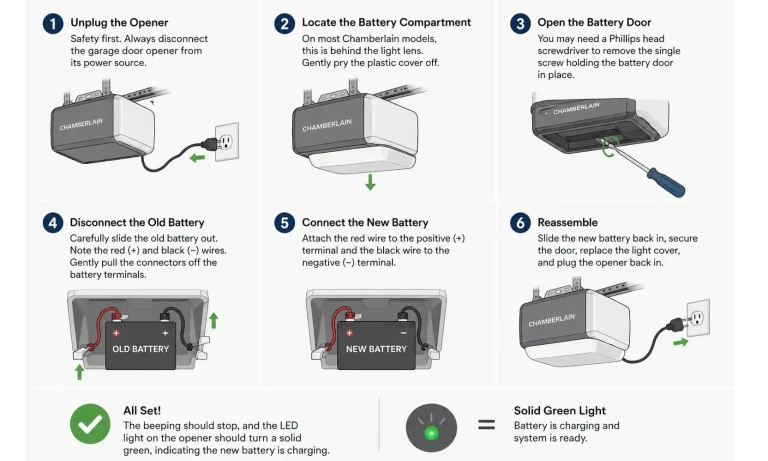
When the beeping starts, it’s time for a change. A typical Chamberlain backup battery lasts about 1-2 years, depending on usage and climate. Replacing it is a straightforward task you can handle in minutes.
Here’s a simple guide to get it done:
- Unplug the Opener: Safety first. Always disconnect the garage door opener from its power source before you begin.
- Locate the Battery Compartment: On most Chamberlain models, this is behind the light lens. Gently pry the plastic cover off.
- Open the Battery Door: You may need a Phillips head screwdriver to remove the single screw holding the battery door in place.
- Disconnect the Old Battery: Carefully slide the old battery out. Take note of the red (positive) and black (negative) wires. Gently pull the connectors off the battery terminals. They might be snug, so a little wiggle can help.
- Connect the New Battery: Attach the red wire to the positive terminal (+) and the black wire to the negative terminal (-).
- Reassemble: Slide the new battery back into its compartment, secure the door, replace the light cover, and plug the opener back in.
The beeping should stop, and the LED light on the opener should turn a solid green, indicating the new battery is charging. For a more detailed walkthrough, our guide on how to change battery in garage door opener can provide additional tips.
Pro-Tip: How to Test Your Battery Backup
Don’t wait for a power outage to find out if your backup works. Test it once or twice a year:
- Unplug your garage door opener from the wall.
- Use your remote or wall control to open and close the door.
- If it operates smoothly, your backup system is ready.
- Plug the opener back in. The LED should indicate it’s recharging.
The Ultimate Beep & Blinking Light Decoder
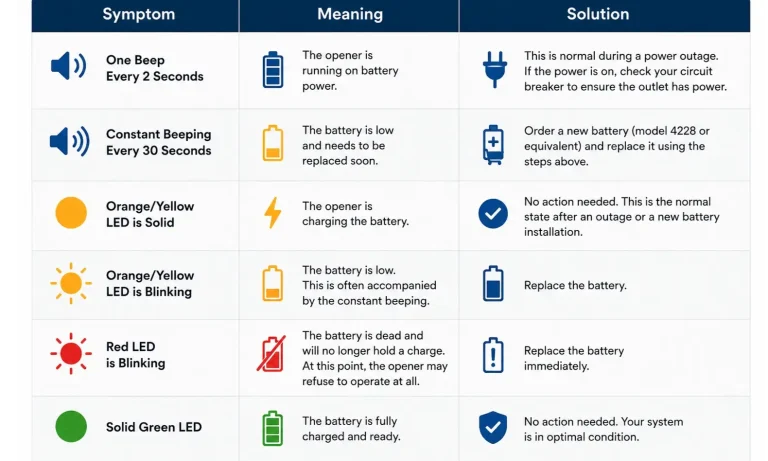
That beeping is your opener’s way of communicating. Instead of a nuisance, think of it as a diagnostic code. Understanding why is my garage door opener beeping is the key to solving the problem quickly.
Here’s a breakdown of the most common alerts for Chamberlain battery backup models:
Why Your Opener Won’t Work With a Dead Battery
This is the most common point of frustration. “My opener is plugged into the wall! Why won’t it work just because the tiny backup battery is dead?”
The answer lies in safety and system design. Chamberlain openers perform a self-check. If the system detects a dead battery, it alerts you with beeps and lights. If the battery is completely failed (the red light stage), the opener’s logic board may prevent operation to avoid a situation where you rely on a backup that isn’t there. It’s a built-in fail-safe designed to force a maintenance check, ensuring the backup system is always ready when you truly need it.
Frequently Asked Questions
Can I just remove the battery and run the opener without it?
While technically possible on some older models, it’s strongly discouraged. The system is designed to have a battery. Removing it will likely cause constant beeping and may prevent the opener from functioning at all. It also defeats the primary safety purpose of the unit.
How long does a Chamberlain backup battery last?
Typically, 1-2 years. Extreme heat or cold can shorten its lifespan. Regular testing can help you gauge its health.
Is it worth paying more for the official Chamberlain (4228) battery?
OEM (Original Equipment Manufacturer) batteries are guaranteed to fit and meet the exact power specifications of your opener. While some third-party batteries may work, they can vary in quality and longevity. For peace of mind, sticking with the manufacturer-recommended battery is often the best choice.
What happens if I replace the battery and the beeping continues?
If a new battery doesn’t solve the problem, it could indicate an issue with the opener’s charging circuit or logic board. At this point, it’s wise to consult a more in-depth Chamberlain garage door opener troubleshooting resource or contact a professional technician.
Your Next Step to a Smarter, Safer Garage
That persistent beep is more than just a sound—it’s your garage door opener asking for a quick check-up to ensure it can protect and provide access for your family during an emergency. By understanding what these alerts mean and how to address them, you transform from a frustrated homeowner into an empowered one.
Keeping your battery fresh is a small act of maintenance that pays huge dividends in safety and reliability, ensuring you’re never left in the dark—or stuck in the garage.
You May Also Like
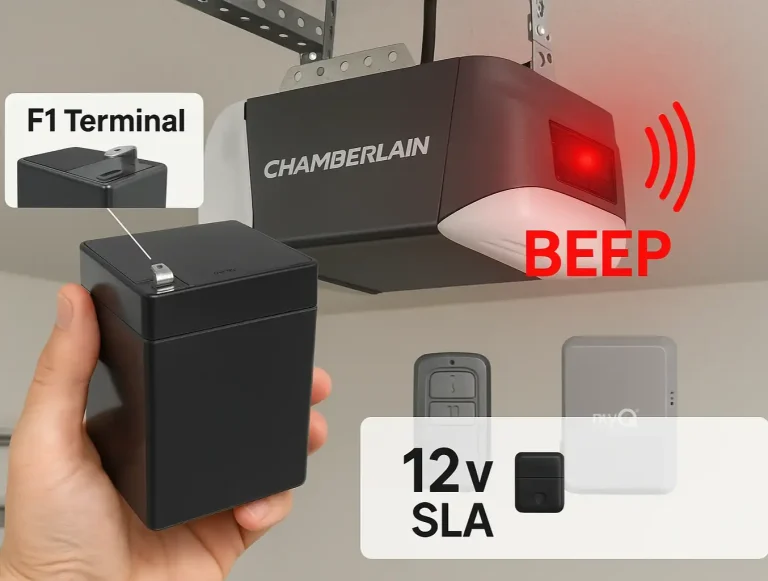
Navigating Chamberlain Garage Door Opener Parts, Accessories And Replacements
When a high-performing garage door system experiences a hiccup—whether it is an annoying, repetitive beep coming from the motor unit or an unresponsive remote control—the physical friction is immediate. For…
Published Date: Jul 13, 2026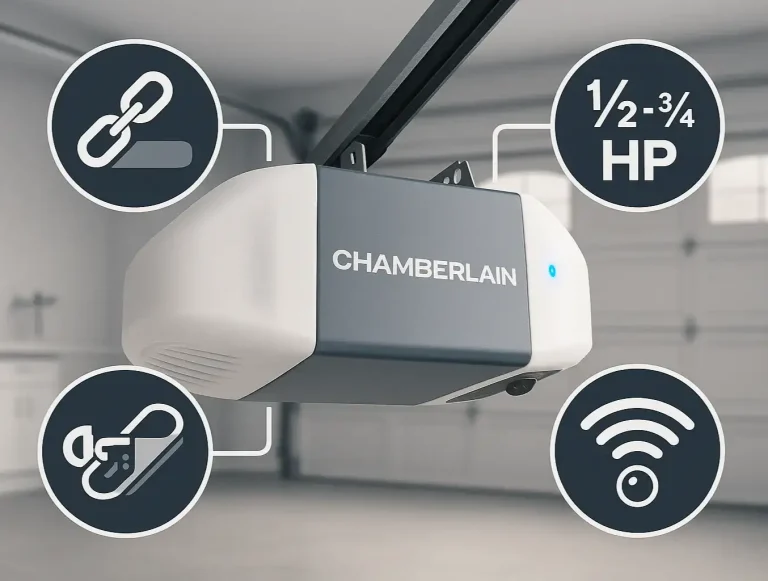
Your Complete Guide to Chamberlain Garage Door Opener Models
Trying to figure out the world of Chamberlain garage door openers can feel a bit like decoding a secret language. You see model numbers like B4613T, hear terms like "HPc," and wonder if you need a "Secure View™" or a…
Published Date: Jun 30, 2026
Differentiating LiftMaster, Genie, and Chamberlain Opener Procedures
You’ve just moved into a new home. You have the keys to the front door, but what about the garage? Who else has a remote? The old homeowner? The realtor? It’s a nagging security question most people forget to ask. Or…
Published Date: Jun 17, 2026