





Navigating Chamberlain Garage Door Opener Parts, Accessories And Replacements
Published: Jul 13, 2026
When a high-performing garage door system experiences a hiccup—whether it is an annoying, repetitive beep coming from the motor unit or an unresponsive remote control—the physical friction is immediate. For homeowners relying on Chamberlain systems, resolving these issues requires precise knowledge of compatibility, technical specifications, and component design.
Rather than sift through scattered manufacturer PDFs or generic retail listings, this comprehensive guide provides the exact diagnostic steps, product cross-compatibility matrices, and technical insights you need to restore your system to peak functionality.
Quick Emergency Triage: Stop the Beeping!
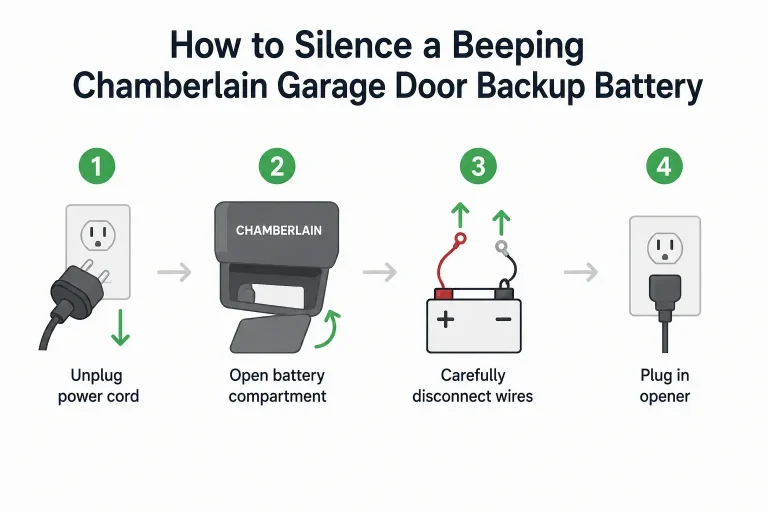
A dying backup battery features an onboard diagnostic alert that emits a single beep every 30 to 60 seconds, accompanied by a red LED status light on the motor unit. Since California Senate Bill SB-969 took effect on July 1, 2019, mandating backup battery systems on all new residential garage installations, this alarm has become a common household disruption.
If you are suffering through this active, loud alert, you can safely silence the system while waiting for your replacement battery to arrive:
- Unplug the main motor unit from the ceiling electrical outlet.
- Open the battery compartment cover (typically behind the light lens) using a Phillips screwdriver.
- Disconnect the wire harness from the battery terminals, removing the Red (positive) connector first, followed by the Black (negative) connector.
- Plug the main motor unit back in. The system will stop beeping and operate safely on standard AC power.
If you encounter further operational issues after silencing your unit, refer to our detailed chamberlain garage door opener troubleshooting guide to isolate mechanical or electrical faults.
The Chamberlain Backup Battery Master Matrix
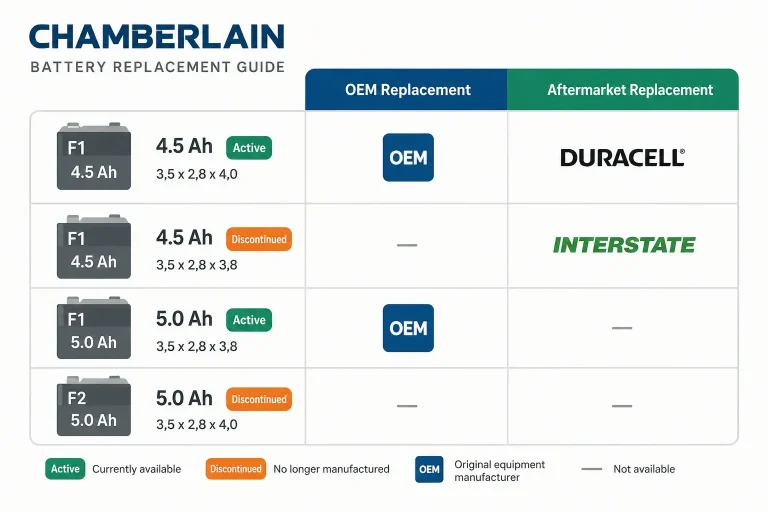
When selecting a replacement power supply, verifying terminal sizes is critical to ensuring compatibility with your garage door opener battery backup system. Chamberlain wire harnesses require F1 terminals (4.75mm wide). Purchasing a battery with F2 terminals (6.35mm wide) will prevent the quick-connect terminals from sliding on securely without splicing.
Standard Sealed Lead Acid (SLA) batteries typically last 1 to 2 years under standard usage, but can extend to 3 to 5 years if operated in temperature-controlled spaces.
Smart Garage vs. Safety Sensors: Myth-Busting
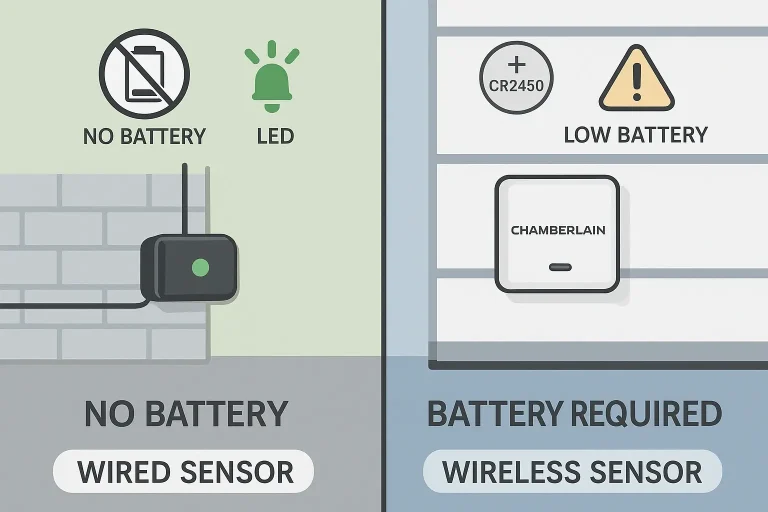
A common area of confusion is the “sensor battery” myth. Users experiencing sensor failures often attempt to find replacement batteries for components that do not use them.
A: Hardwired Safety Reversing Eyes (Model 820CB / 041-0136): These infrared safety beams mounted near the floor are powered directly by the motor unit. If a sensor fails, the door will not close. This points to alignment issues or wire damage rather than dead batteries. If you suspect a connection fault, consult a garage door safety sensor wiring diagram to ensure correct terminal routing, or read our troubleshooting guide on how to resolve an intermittent garage door sensor failure properly.
If you suspect a connection fault, consult a garage door safety sensor wiring diagram to ensure correct terminal routing, or read our step-by-step troubleshooting guide on how to install a garage door safety sensor properly.
B: Wireless MyQ Smart Tilt Sensors (Model G0302 / G0402): This accessory mounts to the top door panel to report the physical angle of the door. This device runs on a single 3V CR2450 Lithium coin-cell battery and will push a notification to your MyQ app when charge levels drop.
Chamberlain Remotes & Keypads Battery Guide
Standard hand-held remotes and wall-mounted wireless keypads rely on lithium chemistry to maintain reliable signal transmission:
- Chamberlain 3-Button Remotes (Model 953ESTD / 953EV): These units run on a single CR2032 3V Lithium battery.
- Wireless Keypads (Model 940EV / 940ESTD): These outdoor entry systems run on a 9V Alkaline battery. Learn how to change battery in garage door opener keypad units safely without losing your programmed PIN settings.
- Xtreme Garage & Creacity Aftermarket Remotes: While older legacy models utilize high-voltage 27A 12V Alkaline batteries, modern compatible remotes have standardized on the CR2032 coin cell.
Premium Gate Openers: The Chamberlain Elite Series
Chamberlain Elite Series commercial and residential gate operators (including the CSL24U and CSW24U) require a heavy-duty 24V DC power structure to manage continuous duty cycles.
Unlike single-battery garage openers, these systems require two 12V 7Ah SLA batteries (Model A-BT-12) wired in series to produce the necessary 24 volts. To wire them, run a jumper wire from the positive (+) terminal of the first battery to the negative (-) terminal of the second, then connect your primary power harness to the remaining open terminals.
Frequently Asked Questions
Can I upgrade my older Chamberlain model to a smart unit?
Yes. By adding a MyQ Smart Garage Hub, you can convert older Security+ 2.0 openers into a modern wifi garage door opener that is compatible with smart home platforms.
Why is my backup battery still beeping after I replaced it?
It takes up to 24 hours of continuous AC connection for the internal charging circuit to bring a new SLA battery up to full voltage. Keep the unit plugged in; the beep should silence automatically once fully charged.
How much does it cost to have a professional replace these components?
While basic battery swaps are easy DIY projects, replacing logic boards, physical drive gears, or safety sensors may require professional assistance. You can budget accurately by reviewing typical automatic garage door repair cost ranges.
Professional Diagnostics and Installation
Whether you are performing quick preventative maintenance or executing a full system overhaul, using high-quality components ensures the long-term safety and reliability of your garage door system. If you prefer professional assistance to handle wiring, component alignment, or complex part replacements, contact the expert technicians at Up & Down Garage Doors to schedule a service visit.
You May Also Like
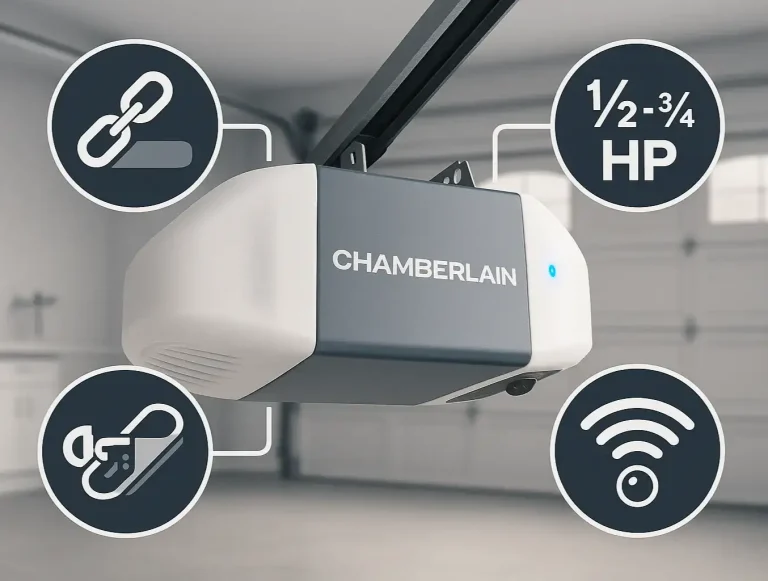
Your Complete Guide to Chamberlain Garage Door Opener Models
Trying to figure out the world of Chamberlain garage door openers can feel a bit like decoding a secret language. You see model numbers like B4613T, hear terms like "HPc," and wonder if you need a "Secure View™" or a…
Published Date: Jun 30, 2026
Differentiating LiftMaster, Genie, and Chamberlain Opener Procedures
You’ve just moved into a new home. You have the keys to the front door, but what about the garage? Who else has a remote? The old homeowner? The realtor? It’s a nagging security question most people forget to ask. Or…
Published Date: Jun 17, 2026
Resetting Chamberlain Garage Door Opener Travel Limits
Is your garage door acting possessed? It starts to close, then suddenly reverses for no reason. Or maybe it stops six inches from the floor, leaving a frustrating gap. You might think you need a full "reset," a term…
Published Date: May 20, 2026