




Master Guide to Garage Door Remote Programming: Step-by-Step Solutions
Published: Sep 21, 2026
Standing on a ladder with a remote in one hand and a manual in the other can be incredibly frustrating. While the North American residential garage door market is highly consolidated—with Chamberlain Group controlling over 70% of active residential garage doors across its Chamberlain, LiftMaster, and Clicker brands—programming does not have to be a guessing game. Interestingly, because LiftMaster dominates the professional channel with over 60% market share while Chamberlain remains the top DIY retail brand, both systems share identical internal logic boards. This means their configuration steps are virtually identical.
When you are figuring out how to program a garage door opener, success relies on understanding your specific hardware pairing, resolving frequency conflicts, and executing precise sequences. Let’s demystify the programming process.
Decoding Your Receiver: The Learn Button Identification Key
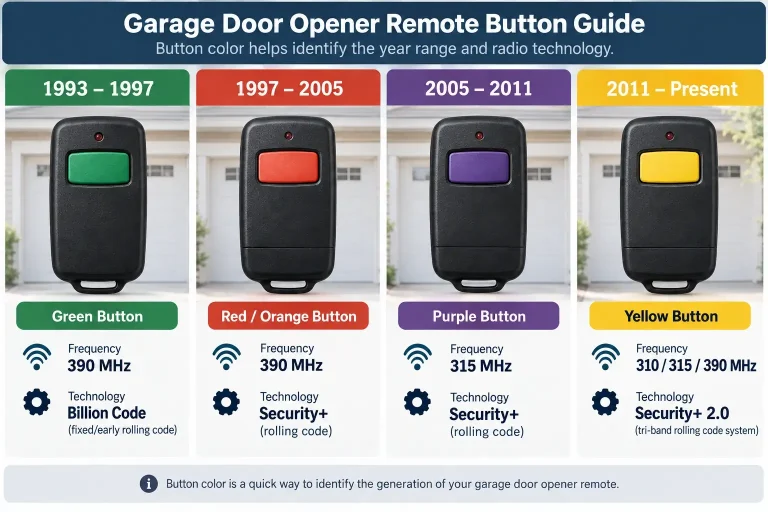
Before attempting to sync any transmitter, you must identify your overhead motor’s communication protocol. This is designated by the color of the learn button on garage door opener units. This color determines the radio frequency and encryption style:
- Green Button (1993–1997): Operates on 390 MHz using Billion Code (fixed/early rolling code technology).
- Red/Orange Button (1997–2005): Operates on 390 MHz utilizing Security+ rolling code systems.
- Purple Button (2005–2011): Operates on 315 MHz utilizing Security+ rolling codes.
- Yellow Button (2011–Present): Operates on 310/315/390 MHz Security+ 2.0 (tri-band rolling code system).
Matching these exact specifications is critical when buying replacement transmitters, which you can verify using a comprehensive garage door remote compatibility guide.
Universal Click-Count Programming Matrix
If you are configuring a universal transmitter, such as a Chamberlain Clicker (KLIK3U or KLIK5U), you must set the brand ID by pressing the programming button a designated number of times. This tells the remote which frequency and brand logic to mimic before attempting to pair it with your motor.
| Brand & Manufacturing Dates | Opener Learn Button Color | Required Button Presses |
|---|---|---|
| Linear (After 1997, 310 MHz) | N/A | 1 |
| Chamberlain / LiftMaster / Craftsman (390 MHz) | Red / Orange | 2 |
| Chamberlain / LiftMaster / Craftsman (315 MHz) | Purple | 3 |
| Chamberlain / LiftMaster / Craftsman (Billion Code) | Green | 4 |
| Genie Intellicode / Overhead Door (1995-2005, 390 MHz) | N/A | 5 |
| Genie Intellicode / Overhead Door (2005-Present, 315 MHz) | N/A | 6 |
| Stanley SecureCode (After 1998, 310 MHz) | N/A | 7 |
| Chamberlain / LiftMaster / Craftsman (Security+ 2.0) | Yellow | 8 |
| Wayne Dalton (After 1999, 372.5 MHz) | N/A | 9 |
To initiate this process, open the remote’s battery compartment to access the program button. Press it until the LED illuminates, then press your transmitter’s main button the exact number of times shown above. Press the program button once more to lock in the setting. This ensures your newly acquired chamberlain garage door opener remote acts exactly like a native system.
Executing the Learn Button Handshake
For standard OEM replacements, pairing is straightforward. Press and immediately release the learn button on your overhead motor unit (never hold it down, as this clears system memory). Within 30 seconds, press and hold the button on your handheld remote. The overhead light bulb will flash or you will hear two clicks from the motor unit, signaling a successful handshake. This is the gold standard when learning how to program new garage door remote devices.
If you are working with legacy systems built before 1993, your equipment relies on physical code matching. If you look inside both your remote and receiver, you will find what is a dip switch on a garage door opener—a row of 8 to 12 tiny sliding switches. To program these systems, you must use a small tool to set the switches in your new remote to match the exact pattern (+, 0, or – positions) found on the receiver.
The Reality of Remote-to-Remote Cloning
A common point of confusion is whether you can you program a garage door remote from another remote without accessing the motor head. According to NEMA safety and manufacturing standards, approximately 92% of active residential garage door openers manufactured after 1996 utilize rolling code security (such as Security+ and Intellicode).
These safety protocols constantly scramble the transmitted frequency code with every single click. Because of this, rolling-code signals cannot be copied remote-to-remote. Any modern remote must establish a direct handshake with the motor’s receiver board. True signal cloning is strictly reserved for older, fixed-code systems (like DIP switch units) where the RF signal is static.
Troubleshooting Common Setup Failures
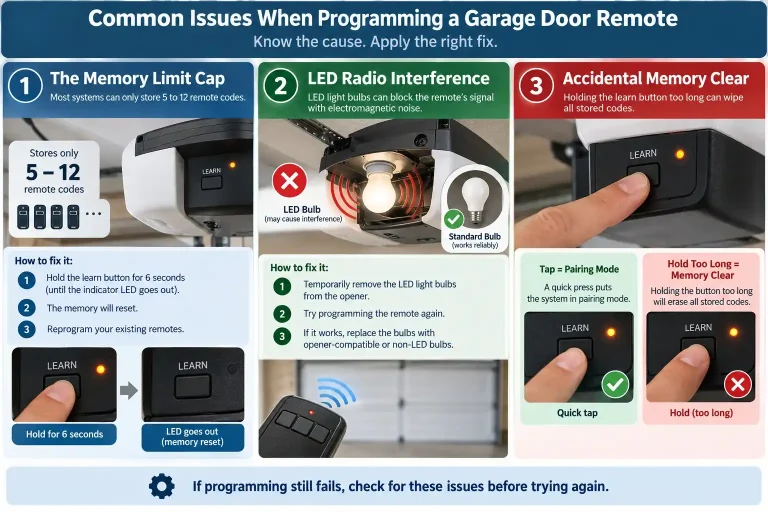
If you have carefully followed the setup sequences and still experience garage door remote programming issues, several overlooked variables are usually at play:
- The Memory Limit Cap: Most modern receiver logic boards can only store 5 to 12 remote codes. If you exceed this limit, the system will reject new pairings. To fix this, you must reset garage door opener memory by holding the learn button down for 6 seconds (until the indicator LED goes out) and then reprogram your existing remotes.
- LED Radio Interference: Cheap or unshielded LED light bulbs installed in the motor head emit electromagnetic noise that directly blocks RF signals. If your garage door remote range is severely diminished or programming fails, temporarily remove the light bulbs and try again.
- Accidental Memory Clear: A common mistake is holding the learn button too long during the initial pairing phase. A simple tap puts the system in pairing mode; holding it wipes the memory clean.
Frequently Asked Questions
Why won’t my universal remote pair with my LiftMaster opener?
This is typically due to a mismatch between the remote’s brand-identifier setting and the motor’s learn button color. Ensure you have entered the correct click-count for your specific Chamberlain or LiftMaster frequency before attempting the motor pairing sequence.
Can you reprogram a garage door remote if it stops working suddenly?
Yes. In many cases, power surges or dead batteries cause the transmitter to lose its pairing code. Simply clear the receiver memory and execute the learn button handshake to re-establish the connection.
What should I do if my garage door remote range has suddenly decreased?
This is most commonly caused by localized radio frequency interference, often from newly installed LED bulbs in the garage or a failing remote battery. Swapping to garage-door-rated LED bulbs or replacing the coin-cell battery usually restores the signal range.
You May Also Like