





Security Protocols for Mobile Wallet Door Keys: The Enterprise Migration Guide
Published: Aug 4, 2026
Physical security is experiencing a silent, structural paradigm shift. As telecommunications carriers aggressively dismantle legacy copper Plain Old Telephone Service (POTS) infrastructure—aiming for full retirement by 2029—and high-frequency RFID cloning tools like the Flipper Zero democratize physical security breaches, the traditional intercom is no longer viable.
For Chief Security Officers, IT Directors, and facility operators, the question is no longer whether to upgrade, but how to do so without introducing new digital vulnerabilities.
Introduction: The Sunset of the Entry Phone
For decades, the standard multi-tenant entry phone system served as the frontline of perimeter defense. Today, these analog networks are facing a forced retirement. With major telecom operators halting new copper installations, the cost of maintaining legacy telephone entry lines is skyrocketing.
Simultaneously, user expectations have evolved. Modern multifamily research reveals that 59% of renters actively prefer properties equipped with mobile-first access control over physical key cards. The convergence of infrastructure decay and consumer demand has made the transition to secure digital credentials an operational necessity.
Anatomy of Legacy Access Control: Videx, BPT, and the VoIP Bridge
Traditional setups—relying on brands like Videx or BPT—typically operate on analog wiring or early VoIP configurations. While these systems successfully routing audio and video signals, they possess major vulnerabilities at the hardware layer.
Legacy entry systems often utilize unencrypted communications. Over 70% of active commercial buildings still rely on legacy 125kHz proximity cards utilizing the Wiegand standard, which can be cloned in under three seconds. This is functionally equivalent to relying on outdated transmitter standards; understanding the vulnerabilities of a rolling code vs fixed code reveals how easily fixed signals are intercepted and duplicated. Furthermore, a physical compromise of the outer chassis often exposes the relay wires, allowing an intruder to bypass authentication entirely.
To mitigate these physical vulnerabilities, modern deployments require strict adherence to garage door keypad safety and modern encrypted signaling protocols.
Unlocking the Future: What Happens When You Open a Door by Mobile Phone?
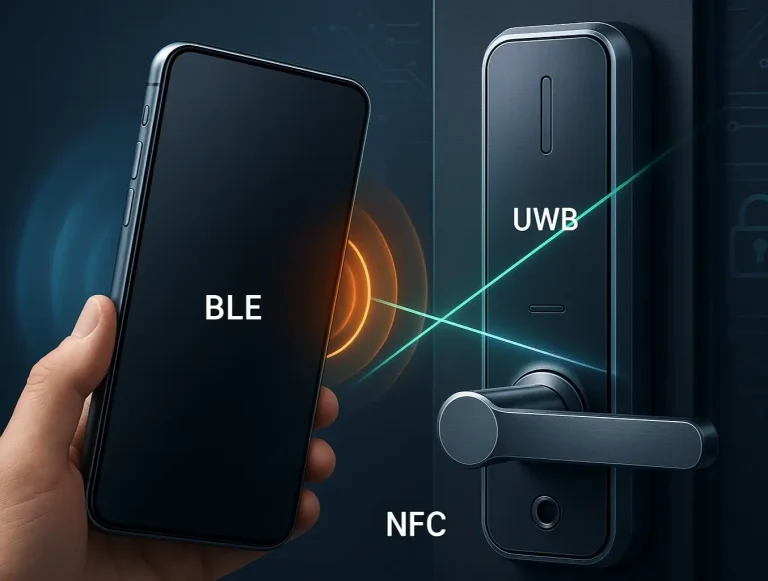
When an operator transition to let users can i open my garage door with my smartphone, they are shifting authentication from physical plastic to encrypted digital credentials. Modern mobile access relies on Near Field Communication (NFC) or Ultra-Wideband (UWB) to perform a secure dynamic handshake with the reader.
Unlike standard apps that require a cellular signal, native mobile wallet keys (such as Apple Wallet or Google Wallet) operate directly via the device’s hardware. By leveraging smart garage door security features, these systems transmit a uniquely rotating cryptographic token for every single interaction, completely neutralizing replay attacks.
The Cryptographic Enclave: Mimicking the "Phantom Secure Phone" Standard
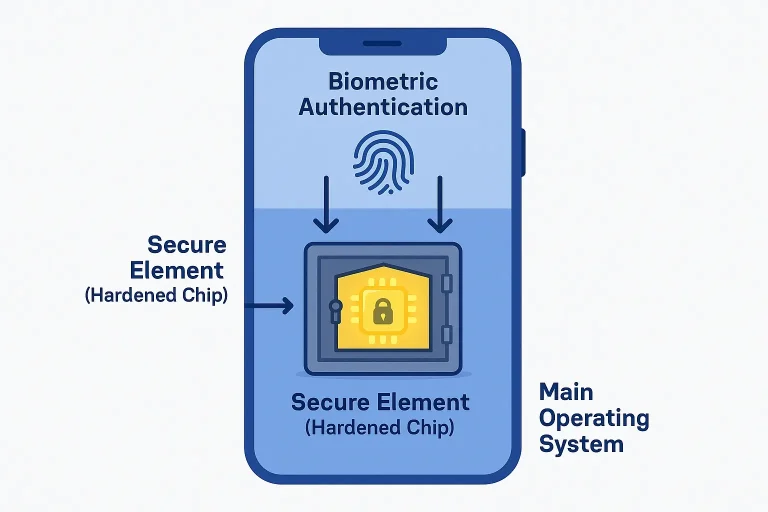
To appreciate the security of mobile wallet credentials, it helps to look at the architecture of hardened endpoints. While commercial operations do not use military-grade devices like the historical “Phantom Secure Phone,” modern smartphones use the exact same architectural philosophy.
Mobile credentials reside within the device’s physical Secure Element (or Secure Enclave)—an isolated, hardware-level cryptoprocessor completely separate from the primary operating system.
Because the OS cannot directly read the keys stored in the Secure Element, malware or system compromises cannot expose your facility’s access credentials. This hardware-level isolation is typically paired with local multi-factor authentication, such as a biometric garage door opener mechanism, ensuring the user is physically verified before transmission.
Threat Modeling & Incident Response: The "Lost Device" Playbook
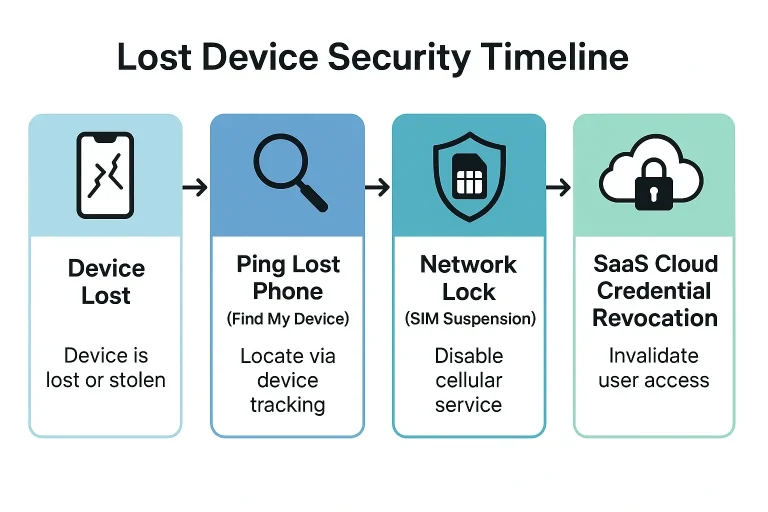
A common concern among security managers is the threat of a lost or stolen credential device. Fortunately, modern cloud-managed access ecosystems allow for real-time risk mitigation.
If a user loses their phone, administrators do not need to replace expensive physical fobs. Instead, they execute a rapid, three-step lockdown:
- Local Authentication Barrier: Unauthorized finders are blocked by mandatory biometric checks (FaceID/TouchID).
- Device-Side Suspension: When the user triggers “Find My” to ping their lost phone, local wallet credentials are encrypted and suspended.
- Cloud-Side Revocation: The system administrator instantly revokes the digital token via their SaaS dashboard, neutralizing the credential across all readers within two minutes.
Transition Checklist: From Entry Phone Installation to Mobile Wallet Keys
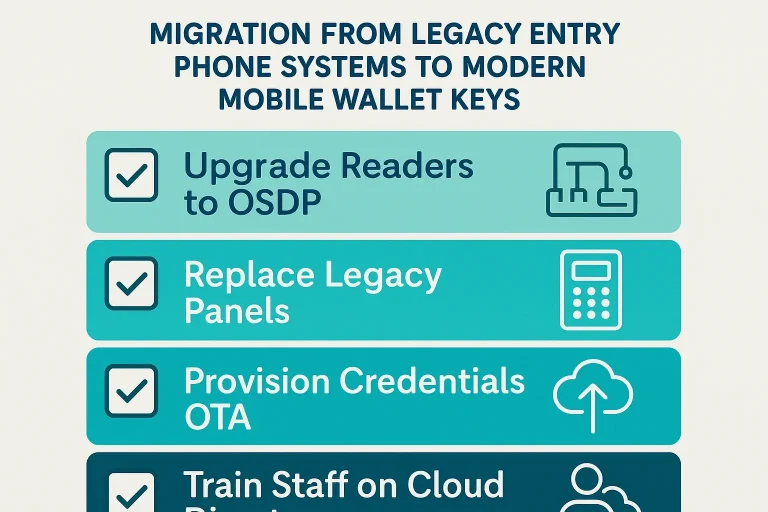
Upgrading a facility requires systematic planning. Whether managing commercial properties or integrating access with heavy physical entry barriers like commercial garage doors, use this migration roadmap:
- Audit Legacy Cabling: Determine if existing wiring can support IP-based controllers or if a wireless cellular bridge is needed.
- Transition to OSDP: Replace outdated Wiegand reader-to-controller wiring with secure, encrypted Open Supervised Device Protocol (OSDP) channels.
- Install Compatible Hardware: Deploy multi-technology readers capable of processing both legacy fobs and high-security mobile wallet credentials simultaneously.
- Integrate Motorized Barriers: Connect the system to a heavy-duty liftmaster commercial garage door opener or security gate to ensure seamless, secure vehicle entry.
- SaaS Directory Integration: Connect the access control platform with your enterprise identity provider (IdP) for automated provisioning and de-provisioning.
Professional support is highly recommended; following a comprehensive smart garage door opener installation guide ensures that physical relays, power backups, and network lines are configured to enterprise standards.
Enterprise Access Control FAQ
What happens if the phone battery dies?
Modern mobile wallets with Express Mode utilize low-power sub-processors, allowing the device’s NFC chip to securely transmit credentials for up to 5 hours after the main phone battery drains.
Can an attacker sniff the credential out of the air?
No. Unlike static cards, mobile wallets use dynamic cryptographic tokenization. The data transmitted is unique to that transaction and cannot be reused, making sniffing or replay attacks mathematically impossible.
How long does it take to revoke a lost phone’s access?
Through cloud-managed SaaS dashboards, credential revocation occurs in real-time. Once an administrator clicks “suspend,” the credential is invalidated across all connected readers globally in under two minutes.
You May Also Like
Demystifying Mobile Key Access: The Cryptography and Hardware Behind Smart Entry Systems
If you are looking to secure your home or business, you have likely run into a confusing sea of search terms. There is a wide gap between basic smartphone troubleshooting (like Android's "Extend Unlock") and physical…
Published Date: Jul 31, 2026
Why Some Garage Door Remotes Have Better Range and Security
Ever found yourself mashing the button on your garage remote, inching closer and closer to the door before it finally responds? You’re not alone. That frustrating moment when your remote seems to have a mind of its…
Published Date: Apr 28, 2026
Troubleshooting Dip Switch Garage Door Opener Range
Does your garage door have a mind of its own? One day the remote works from the end of the street, and the next you have to be inches from the door, mashing the button in frustration. Or worse, the door opens and…
Published Date: Apr 21, 2026